


- Contents
IPA Work Item Client Help
Work item reminders
Your organization’s process designer can build in both due dates and reminders that occur in advance of the due date for work items. IPA Work Item Client reminds you in several ways when a work item due date is approaching or has past:
-
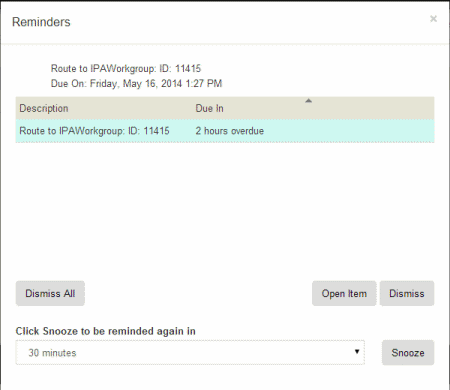
When a reminder threshold occurs, a dialog appears that provides the opportunity to snooze, dismiss, or open the work item.
-
When you log on, any reminders for work items in your queue appear automatically in the Reminders dialog box.
Do any of the following:
-
-
To sort the list. click a column heading.
-
To view a reminder’s due date, select it.
- To pick up the associated work item and open it in the Work Item Viewer, select a reminder and click Open Item.
-
To clear this reminder, select it and click Dismiss.
-
To clear all reminders, click Dismiss All.
-
To postpone a reminder, select a reminder and, after selecting an appropriate interval in the associated drop-down list, click Snooze.
-
-
You can view your current reminders by clicking Reminders. The number of your current reminders appears to the right of this control.
