

- Contents
Interaction Scripter Client User's Guide
Agent
You can use the Agent parameter to identify the type of agent you want to log on as. If the /agent parameter is omitted, the agent is considered to be a regular agent by default. For details and examples, see Set Agent Type at Startup.
Syntax
/agent= <[menu];[standard];[finish | finishing];[all];[ro |
 readonly];[noprompt]>
Options
You can use more than one option on a command line; just be sure and separate each option with a semicolon (;).
- menu
-
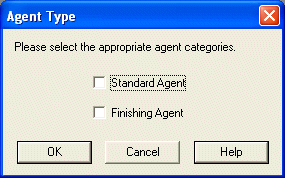
Presents the Agent menu from which the user can select which type of agent they want to log on as.
- standard
-
Logs the agent on as a standard (opener) agent.
- finish | finishing
-
Logs the agent on as a finishing agent.
- all
-
Logs the agent on as a standard agent (opener) and a finish agent.
- ro | readonly
-
Displays the agent type menu in Scripter as readonly, user cannot change type.
- noprompt
-
Tells Scripter client not to show the agent type selection dialog during log on.
Examples
To log on as an standard agent:
InteractionScripter.NET.exe /notifier=myDialerServer /user=craigd /password=1234 /workstation=Station1 /agent=standard
To log on as a finishing agent:
InteractionScripter.NET.exe /notifier=myDialerServer /user=craigd /password=1234 /workstation=Station1 /agent=finishing
To log on using the menu:
InteractionScripter.NET.exe /agent=menu