


- Contents
Interaction Attendant Help
How does the user interface work?
Let's examine Interaction Attendant's user interface, to see how profiles, schedules, and operations are implemented in the software. The figure below shows an inbound call flow:
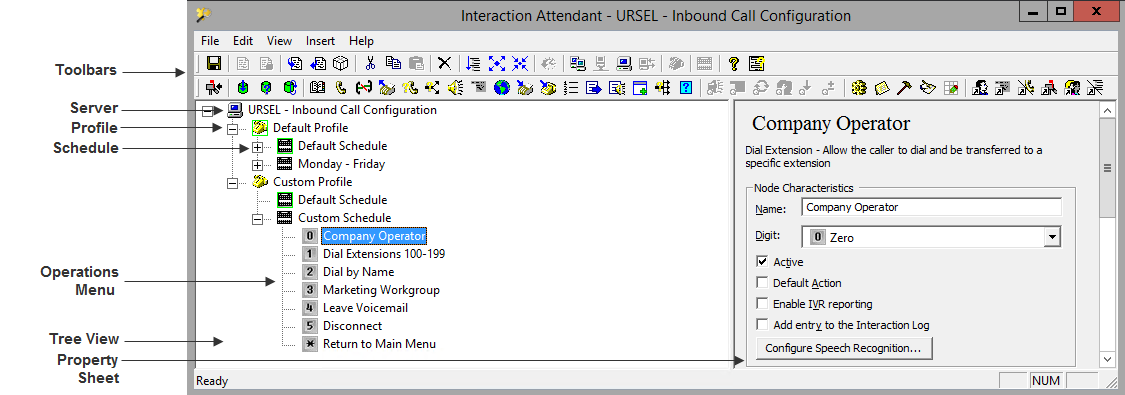
Since Interaction Attendant is a utility for configuring CIC's auto attendant, its user interface is designed to help you construct automated attendant menus. A menu is a collection of one or more operations that process calls based on the keys a caller presses. A caller chooses menu entries by pressing keys on a telephone. Based on the caller's choice, an auto attendant will offer a submenu, transfer a call to a queue, allow callers to search an employee directory, send or receive a fax, or perform many other actions.
A menu is attached to a schedule that determines when the menu will run. A schedule is attached to a profile, which examines incoming calls to select calls to process. A server has one default profile and one default schedule, and may have any number of custom profiles and schedules
Attendant's visual metaphor is effective. It displays profiles, schedules, and operations for multiple servers and different call flows in a Tree pane on the left side of the display. The right side of the screen displays a property sheet for the currently selected node. Subsequent topics discuss these items in more detail.
Related Topics