


- Contents
PureConnect CX Insights Help
Access Control
You can restrict which user, workgroup, or role has access to specific dashboards.
To assign dashboard access:
-
In Interaction Administrator, go to the User, Workgroup, or Role properties dialog.
-
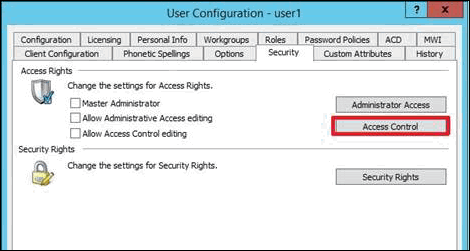
Select the Security tab.
-
Click Access Control.
-
In the Access Control dialog, type dashboards in the search field to filter the list.
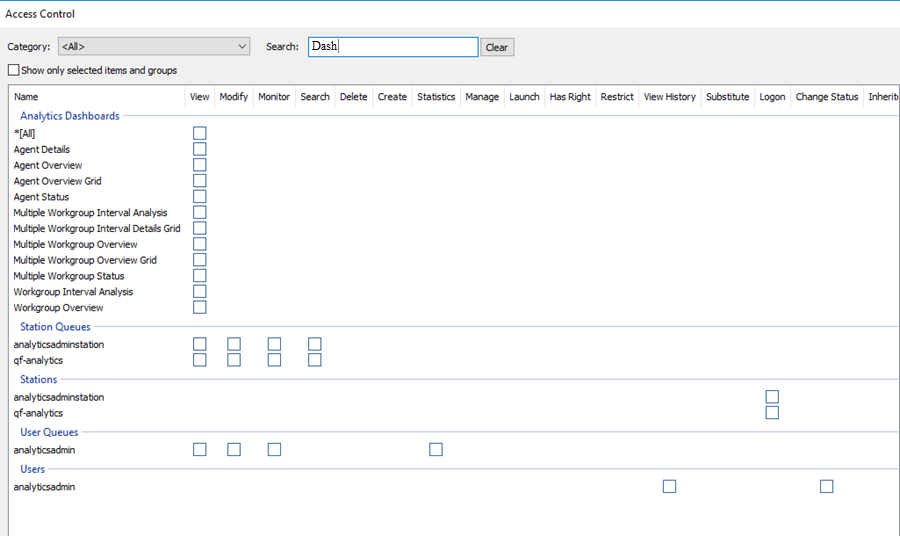
Note: If the IC Server is in sync with the Microstrategy CX insights project, then the check boxes for all the dashboards are displayed.
-
To assign a user, workgroup, or role access to the dashboard, select the dashboard check box, or select All to assign access to all dashboards. Clear a check box to remove the privilege.
-
Click Close.
-
Click OK or Apply to save settings.