

- Contents
PureConnect CX Insights Help
IVR Workflow
The following example helps you to understand the IVR workflow.
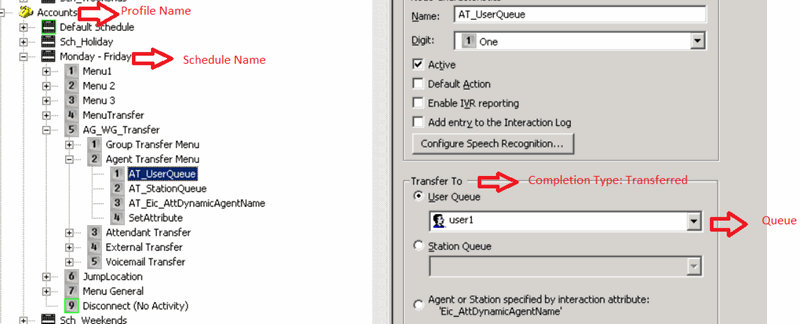
For an example, User has called DNIS, which is related to Accounts profile. IVR Flow followed is Monday-Friday Schedule. User has selected Digit #5 (AG_WG_Transfer) → Digit #2 (Agent Transfer Menu) → Digit #1 (AT_UserQueue) → Call is transferred to User1.
IVR flow: Accounts|Monday - Friday|AG_WG_Transfer|Agent Transfer Menu|AT_UserQueue
Profile Name: Accounts
Schedule Name: Monday-Friday
Exit Path: User Queue: User1
Completion Type: Transferred
Queue: User1