


- Contents
PureConnect CX Insights Help
View and Navigate Create Dashboard Interface
The Create Dashboard Interface consists of several sections, each section allows you to perform specific action related to dashboard.
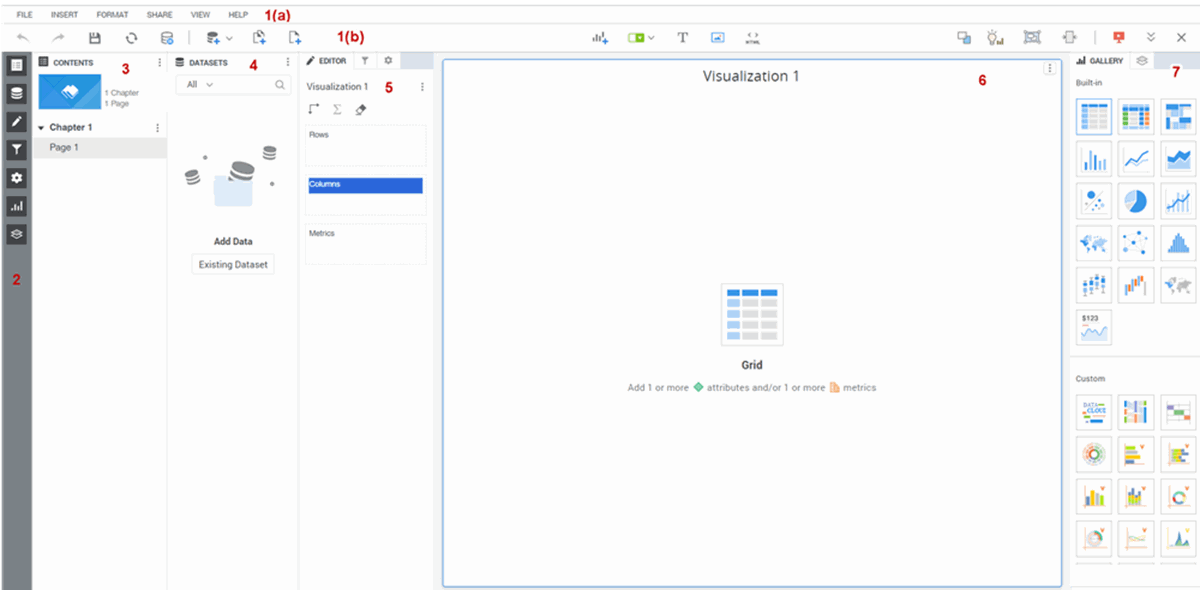
1(a). Top Menu Bar: Display options includes File, Insert, Format, Share, View, and Help
1(b). Icons Menu Bar: Display icons include Undo, Redo, Save, Refresh, Pause Data Retrieval, Add Existing Datasets, Add Chapter, Add Page, Visualization, Filter, Text, Image, HTML Container, Convert to Free Form Layout, Responsive View Editor, Responsive Preview, Presentation Mode, Show Navigation Bar, and Close.
2. View Options: Displays icons includes Contents Panel, Datasets Panel, Editor Panel, Filter Panel, Format Panel, Visualization Gallery, Layers Panel, and Enter Presentation Mode.
3. Content Panel: This includes List View, Tab View - Bottom, Tab View - Top, Expand All, Collapse All, and Help options.
4. Datasets Panel: This includes Replace datasets, create metric, create attributes, Create Links, Link to Other Dataset, Replace or Reference With, Add to Filter, Rename, and Hide options.
5. Editor Panel: This includes Vertical, Horizontal, Color By, Size By, Break by, and Tooltip options.
-
Filter Panel: This includes chapter level filter options and Each Filter Level Options.
-
Format Panel: This includes Bar Configuration, Font Size, Font, Font Color, Chart Background Color, General Settings, Title and Container, Column Headers, Row Headers, and Values options.
6. Visualization: This includes Change Visualization, Change Shape, Swap, Show Totals, Edit Filter, Create Contextual Link, Query Details, Show Data, Remove Data, Data Source, Export, Duplicate, Copy To, Move To, Hide Title Bar, Format, Rename, Delete, and More Options.
7. Gallery: This includes Built-in and Custom options
- Layers: This includes Duplicate, Format, and Delete options.
For more information, see https://doc-archives.microstrategy.com/producthelp/10.6/AnalyticsDesktop/WebUser/WebHelp/Lang_1033/Content/Creating_a_dashboard.htm