


- Contents
PureConnect CX Insights Help
View and Navigate Designer Home Page
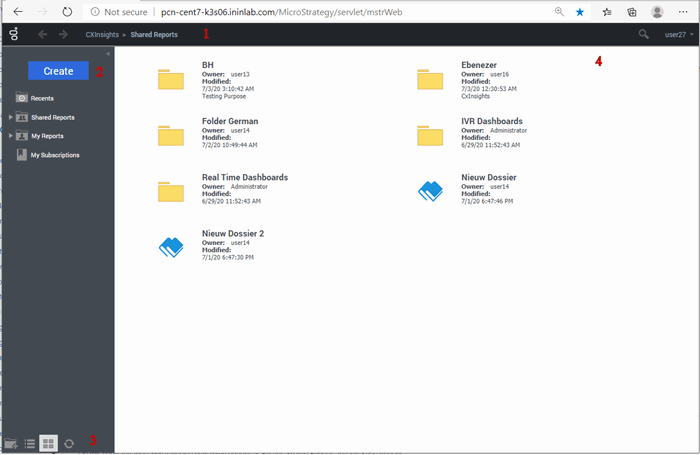
The CX Insights Designer User Home Page consists of several sections, each section allows you to perform specific actions related to that section.
-
Application toolbar: Displays options for viewing user profile menu, search, back and forward buttons, and drop-down menu.
-
User profile menu: To explore preferences, help, about CX Insights and Logout options.
-
Search: To search any dashboard or report by typing the text in the box.
-
Back and forward: Back button to navigate to a previously viewed web page and forward button to navigate to next web page.
-
Drop-down menu: To view projects, home, shared reports, recents, and my subscriptions.
-
Left panel: Displays available options to expand them. Create, Recents, Shared Reports, My Reports, and My Subscriptions appear.
-
Create: To personalize the dashboard as per the requirement.
-
Recent: To view dashboards and pages recently opened.
-
Shared Reports: To view all the dashboard folder.
-
My Reports: To view all reports assigned to you.
-
My Subscriptions: To view subscribed list of dashboards.
-
Left panel bottom navigation: Displays icons to create a new folder, view list, view icon, and refresh button.
-
Create a new folder: To create a new folder
-
View list: To change the view layout of the content in form of a list
-
View icon: To change the view layout of the content in form of icons
-
Refresh: To refresh the web page
-
Content pane: Displays folders and dashboards to work.
Icons
An icon allows you to perform a specific action. The following icons are available on the home page.
| Icon | Name | Description |
 |
Back | A back button allows you to navigate to a previously viewed webpage |
 |
Forward | A forward button allows you to navigate to next webpage |
 |
Create New Folder | Allows you to create a new folder |
 |
View List | Allows you to change the view layout of the content in form of a list |
 |
View Icon | Allows you to change the view layout of the content in form of icons |
 |
Refresh | Refreshes the webpage |
 |
Expand | Expands a section of the Work Form to display its contents. |
 |
Collapse | Collapses a section of the Home page to hide its contents. |