

- Contents
PureConnect Release Notes
E911 Emergency Calls
PureConnect now supports E911 (Enhanced 911) for emergency calls. E911 provides a caller's location information to 911 dispatchers. PureConnect routes the 911 call to the nearest PSAP (Public Safety Answering Point) based on this emergency location information. This routing enables emergency services to be dispatched quickly to your exact location. The E911 service provider, West Corporation, validates and provisions this emergency location information.
Interaction Administrator
Requirements: The PureConnect administrator must subscribe to the E911 service with West Corporation, then enable and configure the E911 feature in Interaction Administrator. This configuration includes specifying server parameters, WestE911 configuration, and location information for each CIC station. For more information, see the Interaction Administrator help and the E911 Technical Reference.
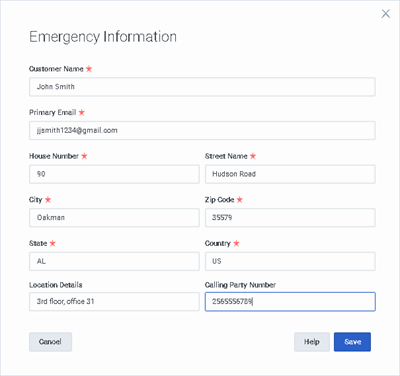
In summary, CIC supports a new server parameter, E911Enabled. To enable the E911 feature, set the E911Enabled server parameter to True. You supply West account information in the System Configuration > WestE911 configuration dialog. When you enable the E911 feature, new fields appear in the Emergency Information tab of the Station Configuration dialog.
CIC Clients
Agents can dial 911 from any client including Interaction Desktop, PureConnect for Salesforce, or Interaction Connect.
Agents can update their emergency details for managed and non-managed stations only from Interaction Connect or Interaction Administrator. Agents who log on through WebRTC or a Remote Number can update emergency information only through Interaction Connect. To update their E911 information, agents can select the Update Emergency Info option from the Interaction Connect menu.