


- Contents
PureConnect Release Notes
Interaction Connect Enhancements
This release contains several enhancements to Interaction Connect. For more information about the features and enhancements described here, see the Interaction Connect Help.
Support for Email Interactions
Users can now reply to ACD-routed email messages. Like with other interaction types, CIC reports and statistics can include email message replies. With support for email interactions, Interaction Connect now supports all interaction types, except Interaction Process Automation work items.
As with other interaction types, users see email interactions on the My Interactions tab and they receive pop-up notifications to alert them to email interactions.

Alerting email interaction on the My Interactions tab in Interaction Connect
The email editor in Interaction Connect offers a rich email experience, similar to the one in Interaction Desktop. The email editor enables users to customize email messages in many different ways, including:
-
Changing the font, font size, and font color
-
Highlighting text
-
Aligning and indenting text
-
Inserting hyperlinks and images
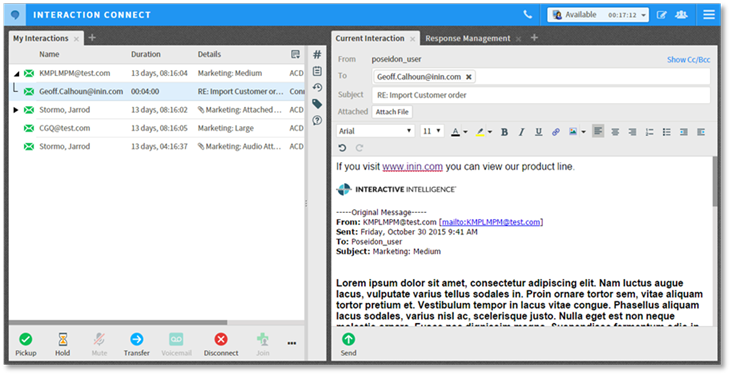
Working with an email interaction
The email form also includes the ability to resolve contacts automatically as the user types in the To, CC, and BCC fields. This ability reduces the time it takes to respond to an email interaction.
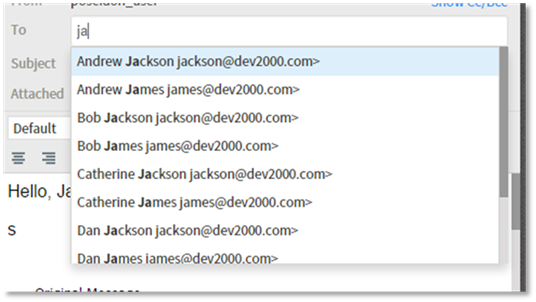
Contact resolution
For more information about email interactions in Interaction Connect, see the Email Messages section of the Interaction Connect help.
Support for Response Management
Interaction Connect now supports Response Management, which enables the use of pre-defined items, such as messages and stored files, to more quickly handle interactions. CIC administrators can create system-wide response items and organize them into categories. Administrators can then grant the necessary rights for all or selected users to access a particular library of response items.
Users can view, select, and use a stored response during a chat session, when replying to an ACD-routed email interaction, and when responding to a callback request.
Note: A future release of Interaction Connect will allow users to create and manage their own personal responses. Users can view, select, and use any existing personal responses they have created using another CIC client, like Interaction Desktop.

Response management library with several categories and items
Response management also includes the ability to use macros. Macros allow information to be filled in dynamically when the response item is chosen, reducing the overall number of response items that you need to create.
Macros can be items such as:
-
The user name
-
Interaction attributes, including custom attributes
-
The current date and time
Under Signature in the following screen, the chosen response item includes the macro [Username]. In the interaction, the user’s name, Nate Everding, is filled in when the response item is inserted. Since the user name is filled in dynamically, every user could potentially use this one response item, eliminating the need to create a signature response item for each user.

UserName macro fills in user name
Response management shortcuts allow quicker insertion of response items. In the screen above, the signature response item has the shortcut “sig.”
In the body of the email below, the user types an s and then presses Ctrl+Spacebar. Since there are two response items with shortcuts that begin with s, the user sees a list of the two options. Had there only been one response item with a shortcut that begins with s, it would have been automatically inserted.
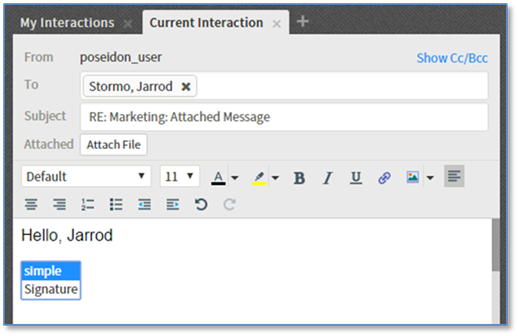
Example of response management shortcuts
For more information about response management, see the Response Management section of the Interaction Connect help.