


- Contents
PureConnect Release Notes
Interaction Connect Improvements
CIC 2016 R3 includes several enhancements to features in Interaction Connect.
Wrap-up Codes
A user on an ACD interaction now has the option to set a wrap-up code. Wrap-up codes indicate the nature of an interaction, such as a billing problem, new order, or service request. CIC administrators can associate wrap-up codes with any workgroup queue. Reports are available to categorize call details by wrap-up codes.
Users have two options when setting wrap-up codes. The first option is to select a wrap-up code in the Interaction Properties dialog box during an interaction.
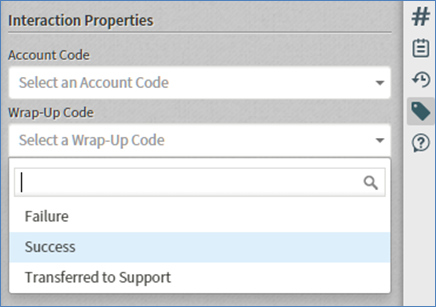
Setting the wrap-up code on an interaction using Interaction Properties
The second option is to select a wrap-up code from the Assign a Wrap-Up Code dialog box, which appears when the interaction disconnects if no wrap-up code is already set. The dialog box closes after a configurable amount of time, but a user can still set the wrap-up code in the Interaction Properties dialog box.
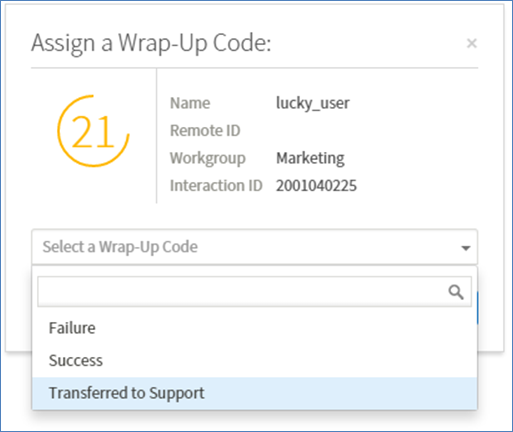
Setting the wrap-up code from the Assign a Wrap-Up Code dialog box
Secure Pause
Secure recording pause is a feature that an agent can initiate when requesting sensitive input, such as a social security number or credit card information, from a customer. The agent can initiate the pause using the Secure Pause icon on the queue toolbar.
The Secure Pause button is only available if:
-
The user has the necessary security rights and adds the button to the toolbar.
-
The feature is enabled.
-
There is a selected interaction that is in an appropriate state, such as connected.

The Secure Pause button appears on the queue toolbar when enabled
To initiate a secure pause, the agent clicks the Secure Pause icon. All recordings of the interaction pause for a configurable amount of time. An administrator can globally configure the length of secure pauses in the Recorder configuration in Interaction Administrator. During the pause, the amount of time remaining in the secure segment appears on the toolbar. The recording resumes when the pause is complete.

The secure pause timer counts down the amount of time remaining
To extend the pause, the agent can click the icon again. The secure pause terminates when the configured amount of time elapses.
Dial on Behalf of Workgroups
If the CIC administrator enables advanced dialing options for an agent and that agent is a member of at least one workgroup and has at least one account code to select, then the Advanced Dialing Options dialog box appears every time the agent starts a call. This prompts the agent to assign the appropriate account code and/or designate a workgroup.
If an agent designates a workgroup when making a call, this action associates the outbound call with a workgroup. Primarily used for administrative and reporting purposes, the dial on behalf of a workgroup feature enables the call to count towards an agent’s and the workgroup’s statistics.
Note: An agent can only dial on behalf of a workgroup in which his or her status is Active.
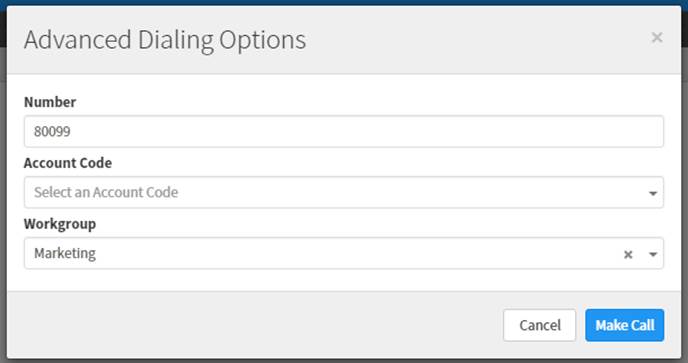
Advanced dialing options