


- Contents
PureConnect Release Notes
Interaction Connect Workgroup Activation Management
A user who has an Interaction Supervisor Plug-In: Workgroups license and who has enabled supervisor features can manage other users' workgroup activation status from various places in Interaction Connect.
New User Activations and Workgroup Activations buttons can appear on the Company Directory or workgroup directory toolbars. You can also manage user Activations from the Agent Statistics view. And you can manage the activation status for members of a workgroup from the Workgroup Statistics view and the Workgroup Overview.
You use a new activation toggle control to manage activation status. You can also use this new control to manage your own workgroup activation status in the Workgroup Activation dropdown list.
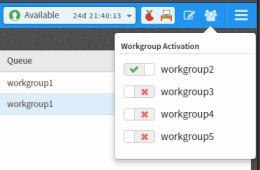
For more information, see Change a User's Activated Workgroups in the Interaction Connect help.