


- Contents
PureConnect for Salesforce
Voicemail view
The Voicemail view appears in a separate browser window when you click the Voicemail button. It displays a list of your current voicemail messages. You can use the integrated voicemail player to play back voicemail messages to your phone or delete old voicemail messages.
Voicemail View Features
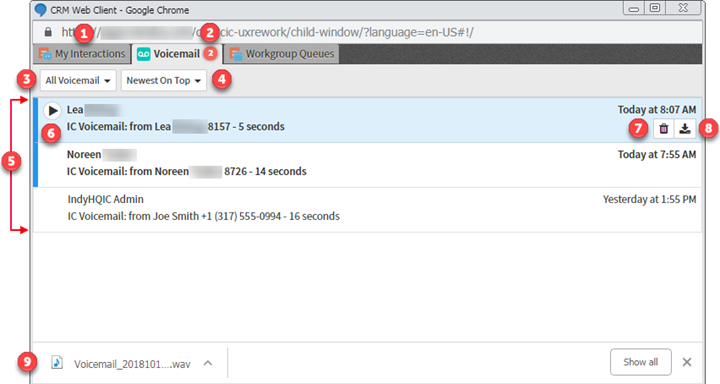
This diagram illustrates the main features of the Voicemail view.
|
1 |
The My Interactions view also appears in the browser window. You can switch back to this view while managing voicemail messages and manage other currently connected interactions. |
|
2 |
The number of unheard messages appears on the Voicemail tab. |
|
3 |
Select the type of voicemail messages to display in the Voicemail list:
|
|
4 |
Select a sorting option:
|
|
5 |
The Voicemail View contains a list of voicemail messages you have not yet deleted, including both previously played and unheard voicemail messages. A vertical scroll bar appears if you have more voicemail messages than can be displayed at one time. Tip: A blue bar indicates an unheard message. Note: If your CIC administrator configures your user account to receive an email alert whenever you receive a voicemail message, then two entries appear for each voicemail message: a voicemail notification and the voicemail. You can select either the notification or the voicemail and click Play to listen to the voicemail. |
|
6 |
The currently selected voicemail message appears shaded. Click the Play control to listen to the currently selected voicemail message. |
|
7 |
Click the Delete control to delete the currently selected voicemail message. Tip: To delete multiple messages at the same time, press and hold the Ctrl key and select the messages, then click the Delete control. |
|
8 |
Click the Download control to download the currently selected voicemail message as a WAV file to your workstation. Use your default audio player to playback the voicemail message. Note: If your designated audio player does not play the voicemail message then it is likely that the required codec (software that compresses and decompresses digital audio) is not installed on your computer. Some recent operating systems no longer include the TrueSpeech codec. For more information, contact your CIC administrator. |
|
9 |
Downloaded messages appear in your browser's File Download location. Click to play back the voicemail message in your default audio player. |