


- Contents
Factory Image Restoration Procedures 04 Technical Reference
Restore Factory Defaults
If you properly configured the RAID, you can restore the device to factory settings. The reimaging software resides on an internal USB flash drive. To access the internal drive, modify the BIOS start sequence to start from the USB drive instead of RAID, or do a one-time startup override described in the following steps.
-
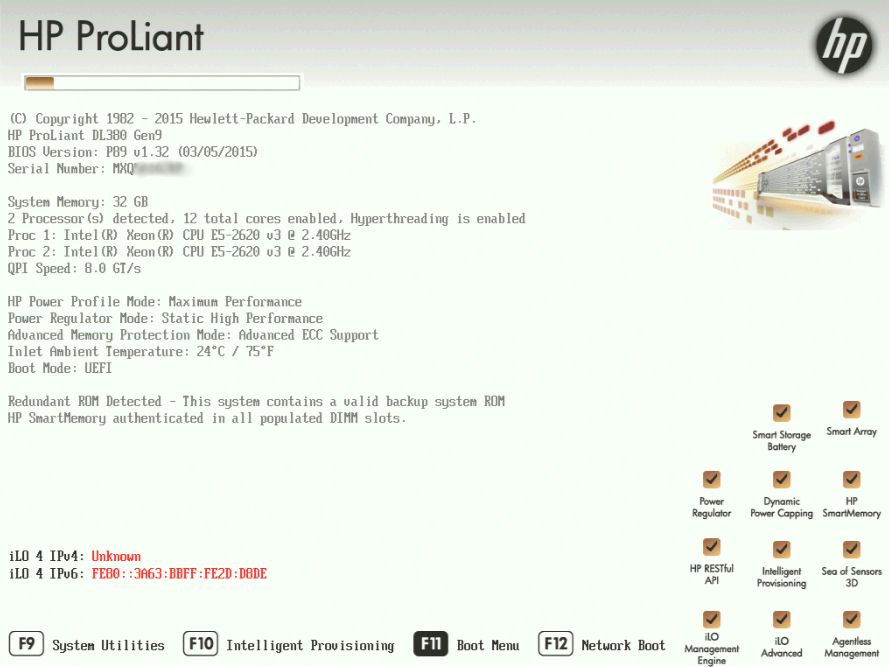
Restart your computer. The HP ProLiant Power-On Self-Test (POST) runs.
-
Press F11 to enter the Boot Menu.
-
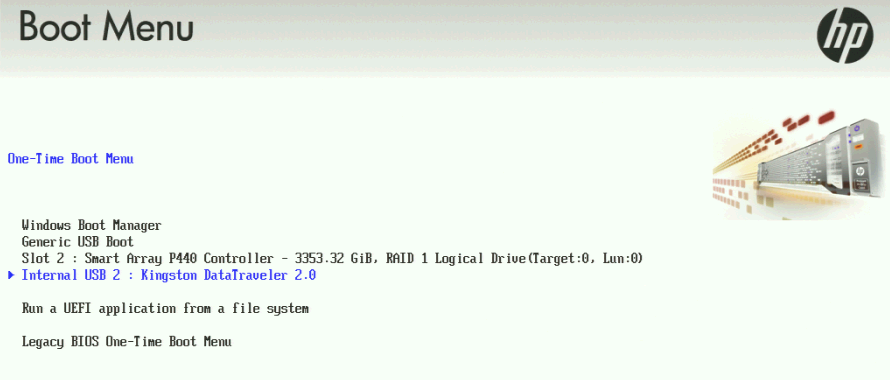
Select Internal USB and press Enter.
-
Wait for the system to start. When the system completes the process, the Welcome to the Interaction Recovery Environment screen appears.

-
Ensure that the Factory Image is selected and then click Restore Image. The system requests confirmation of the recovery operation.
-
Click Confirm to proceed.
-
Wait while the device is reset to factory defaults. This can take several minutes. The process is complete when Factory reversion complete appears.
-
Click Restart in the lower right corner of the page.
-
Select Yes to confirm that you want to restart.