


- Contents
Interaction Media Streaming Server Technical Reference
Interaction Media Streaming Server Network Technologies

|
Notifier |
Proprietary communication method that allows the CIC systems to exchange messages efficiently. |
|
Session Initiation Protocol (SIP) |
Interaction Media Streaming Server uses SIP to establish communication channels and relay supported resources, codecs, and media player operations. The default port is 6060. |
|
Real-time Transfer Protocol (RTP) |
Interaction Media Streaming Server sends audio to Interaction Media Server through RTP. The system always sends audio using the G.711 codec. The default port range is 16384-32767. |
|
Media Resource Control Protocol (MRCP) |
Interaction Media Streaming Server uses MRCP version 2 to communicate with the CIC server. These systems use MRCP to send and receive specific media commands. The default port is 8104. |
|
File Based Mail Connector (FBMC) Internet Message Access Protocol (IMAP) |
Interaction Media Streaming Server uses these protocols to communicate with and retrieve audio files from email messages on an email server. |
|
Hypertext Transfer Protocol (HTTP) |
Interaction Media Streaming Server uses HTTP to allow configuration through its web interface. The default port is 8190. |
Single location
Interaction Media Streaming Server can be a centralized source of streaming audio for an entire CIC network.
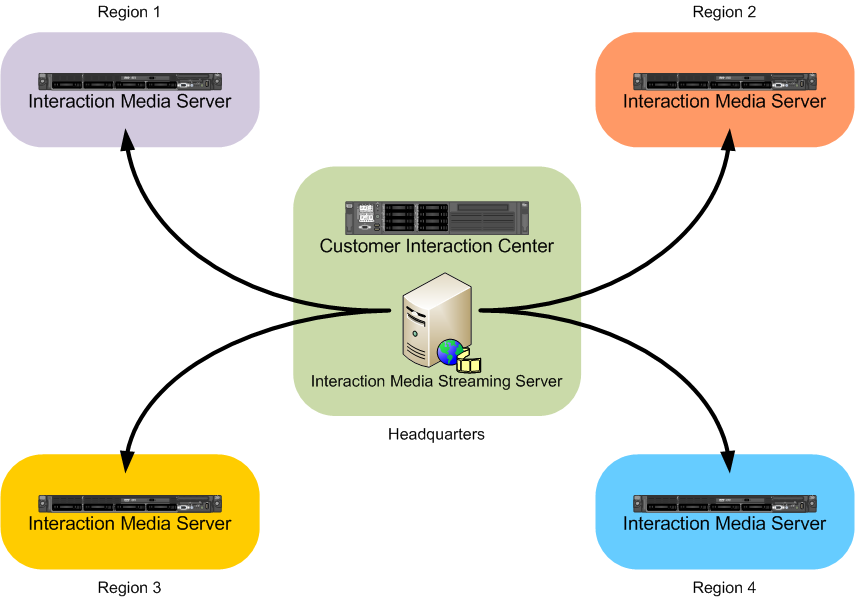
Multiple locations
You can deploy multiple Interaction Media Streaming Servers to service different Locations, such as in other countries or regions of the world.

Hybrid deployment
You can deploy separate installations of Interaction Media Streaming Server with each one handling a single function. For example, you can deploy one Interaction Media Streaming Server that only retrieves voice mail messages in a central headquarters location that also contains the email server. You can then deploy multiple Interaction Media Streaming Servers that only play streaming audio in each location defined in your Customer Information Center environment.

Selection rules
Using MRCP selection rules, you can configure CIC to use specific Interaction Media Streaming Servers in specific or variable location. For more information about MRCP selection rules, see the MRCP Technical Reference.
Load balancing
You can deploy multiple Interaction Media Streaming Servers in a single location to service high volumes of call traffic. For load balancing between multiple Interaction Media Streaming Servers, use the same name for an external audio source on each server. The CIC server then selects the Interaction Media Streaming Server with the most available resources to service the call.
For example, if you attach an MP3 player to each of two Interaction
Media Streaming Servers in a location and configure MP3
as the
name for each MP3 player source, the CIC server selects the Interaction
Media Streaming Server with the most available resources. The system plays
the audio stream from MP3
on that specific Interaction Media Streaming
Server to the caller.
