

- Contents
MRCP Technical Reference
Assign an MRCP server to a Location
If you have MRCP servers in multiple regions, you can ensure the best performance and most efficient use of available WAN bandwidth by assigning your MRCP servers to Locations.
Note:
To do this procedure, you must have previous defined Locations through
Interaction Administrator. For more information, see "IC Server"
> "Regionalization" > "Create Location" in Interaction
Administrator Help.
-
On the CIC server, open Interaction Administrator.
-
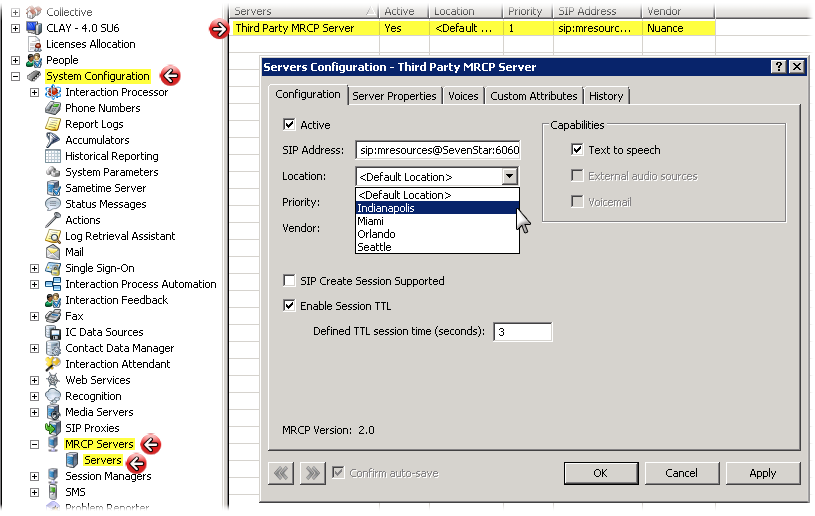
In the left pane of the Interaction Administrator window, expand the System Configuration container.
-
Locate and expand the MRCP Servers container.
-
Select the Servers container.
The right pane displays your defined MRCP servers.
-
Double-click an MRCP server entry that you want to assign to a defined Location.
The Servers Configuration dialog box for the select MRCP server appears.
-
In the Location box, select a defined Location to which you want to assign this MRCP server.
Tip:
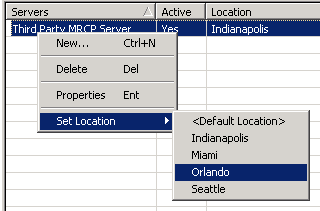
You can quickly assign MRCP servers to a location by right-clicking the
MRCP server entry in the right pane and selecting the Location from the
resulting context menu.