


- Contents
PureConnect Installation and Configuration Guide
Enable Exchange Web Services for users
After you configure CIC for Exchange, follow this procedure to enable Exchange Web Services for users who will connect to Exchange using the Exchange Web Services protocol. (You can also enable Exchange Web Services for workgroups".)
-
In Interaction Administrator, click the People container and then click the Users sub-container.
-
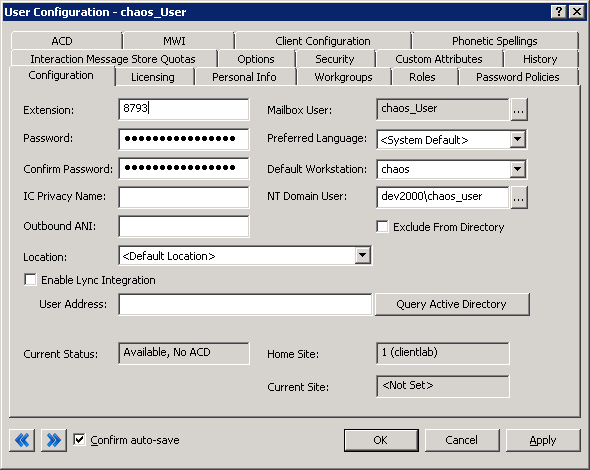
In the right-hand pane, double-click the user name to edit. The User Configuration dialog box appears.
-
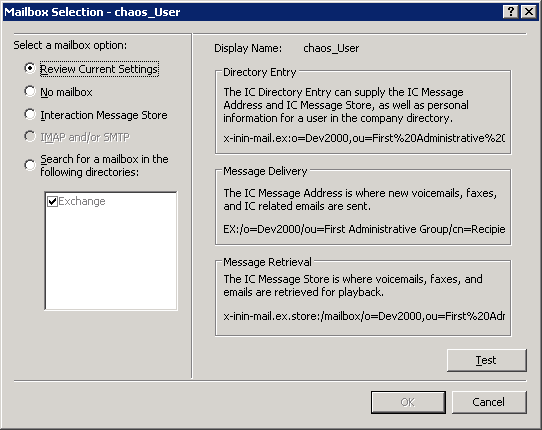
On the Configuration page of the User Configuration dialog box, click (...) to the right of Mailbox User. The Mailbox Selection dialog box appears.
-
On the Mailbox Selection dialog box, click Search for a mailbox in the following directories. Select Exchange for EWS or Graph and click Search. The Exchange e-mail address appears in the search results.

-
Click OK to close the Mail Selection dialog box.
-
Click OK to close the User Configuration dialog box.