


- Contents
PureConnect Installation and Configuration Guide
Select the Microsoft SQL Server
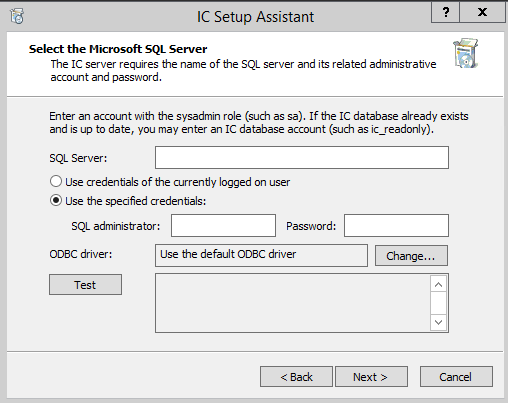
This screen appears if you selected Microsoft SQL Server in the Database Configuration screen. It specifies the SQL Server database administrator account user name and password, and other SQL Server-related configuration information.
Note: If you selected an Oracle database, corresponding Oracle-related screens will follow. Click Help (?) for information.
SQL Server
Enter the fully qualified domain name (FQDN) of the SQL Server that will host the CIC database. This machine must actively be running SQL Server and on the network. Make sure that the address you enter is reachable by client workstations.
Important: The SQL Server must be configured to be case-insensitive. CIC cannot log into a case-sensitive SQL Server or SQL Server instance name. For more information, contact PureConnect Customer Care.
Use credentials of the currently logged in user
Select this option if you wish to use Windows Authentication. IC Setup Assistant will use the currently logged in administrator account (CIC administrator account) credentials to connect to the SQL Server, create the CIC database, and create the three standard CIC database user accounts.
Use the specified credentials
Select this option if you wish to use the database administrator account or other account to connect to the SQL Server, create the CIC database, and create the three standard CIC database user accounts.
SQL Administrator Name and Password
The SQL Administrator and Password fields are enabled when the Use the specified credentials option is selected.
Enter an account with the sysadmin role. In most cases, this is the built-in database administrator account, sa. However, any account with the sysadmin role can be used.
Note: If the CIC database already exists and is up to date, you may enter an CIC database account, for example IC_ReadOnly (one of the standard CIC database user accounts).
ODBC Driver
We recommend that you keep the default setting of "Use the default ODBC driver". Select Change... to change the ODBC driver only if you have contacted PureConnect Customer Care first to verify the driver.
Test
Click Test to verify that the CIC Server is able to connect to the database server and that the administrator name and password are correct. If IC Setup Assistant cannot verify this information, the problem must be fixed before IC Setup Assistant can continue.