


- Contents
PureConnect Licensing Technical Reference
Sales Orders and Billing
How sales orders are related to licenses
The Genesys sales order process is based on part numbers. Genesys maps these part numbers internally to the appropriate PureConnect licenses to ensure that all appropriate capabilities and features are enabled for use.
The following table provides examples of keys in the license file that apply to a user or station.
|
Access Licenses |
||||
|---|---|---|---|---|
|
4.0 Part Number |
Number of Assigned Licenses |
Number of Pooled Licenses |
Description |
4.0 Key |
|
SW-001- 4.0-AL01 |
0 |
25 |
Basic Station |
I3_LICENSE_BASIC_STATION (1) |
|
SW-001- 4.0-AL02 |
5 |
0 |
Business Client |
I3_LICENSE_BASIC_STATION
(1) |
|
SW-001- 4.0-AL03 |
5 |
25 |
Phone-only Call Center |
I3_LICENSE_BASIC_STATION
(1) |
|
SW-001- 4.0-AL04 |
5 |
25 |
Contact Center Level 1 |
I3_LICENSE_BASIC_STATION
(30) |
|
Access Add-on Licenses |
||||
|
SW-001- 4.0-AA01 |
2 |
0 |
Interaction Supervisor Add-on |
I3_ACCESS_DIALER_SUPERVISOR_PLUGIN (1) I3_ACCESS_WORKGROUP_SUPERVISOR_PLUGIN (1) I3_ACCESS_HISTORICAL_REPORT_SUPERVISOR_PLUGIN (1) |
|
SW-001- 4.0-AA02 |
1 |
1 |
Interaction Scripter Add-on |
I3_ACCESS_INTERACTION_SCRIPTER_ADDON (1) |
|
SW-001- 4.0-AA17 |
2 |
2 |
Interaction Report Assistant |
I3_ACCESS_REPORT_ASSISTANT_SUPERVISOR_PLUGIN (1) |
How license assignment impacts billing
Users and add-ons
License usage for PureConnect has two main categories: Agent and Business User. These categories are mutually exclusive in that a particular user cannot count as both an agent and a business user. A user's assigned licenses establish the user as either an Agent or Business User. PureConnect considers all other license usage categories as add-ons for Agents only. If PureConnect counts a user for any particular agent add-on, PureConnect cannot count that user as a business user.
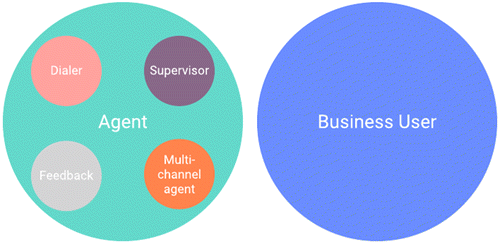
Usage calculation examples
-
User Tina logs on and has the I3_CLIENT_ACCESS license (and nothing else). Tina's license category for her active session is BUSINESS USER.
-
User Sam logs on and has the I3_CLIENT_ACCESS and I3_ACCESS_ACD_MEDIA_1 licenses. Sam's license category for his active session is AGENT.
-
User Jane logs on and has the I3_CLIENT_ACCESS, I3_ACCESS_ACD_MEDIA_1, I3_ACCESS_ACD_MEDIA_3_PLUS, and I3_ACCESS_FEEDBACK licenses. Jane's license categories for her active session are AGENT, MULTI-CHANNEL, and FEEDBACK.
Categories and licenses
Agent and Business User categories
|
Category |
Licenses |
|---|---|
|
Business User |
I3_CLIENT_ACCESS (and none of the following licenses) |
|
Agent |
I3_ACCESS_ACD_MEDIA_1 or any add-on license Example add-on licenses:
|
Agent add-on categories
Each license that you assign to a user impacts your monthly bill. We recommend that you only assign the licenses that the users needs.
Important!
Genesys updates these mappings for every release; therefore, the following
list is not a definitive legal statement of exactly what Genesys does.
Once a new license appears in MyCloud, that's when it impacts your
bill. For more information about accessing and using MyCloud, see
the MyCloud Self-service documentation.
|
Add-on Category |
Licenses |
|---|---|
|
Analyzer |
I3_ACCESS_ANALYZER |
|
CX Insights |
I3_ACCESS_ANALYTICS_CORE |
|
Dialer |
I3_ACCESS_DIALER_ADDON |
|
Feedback |
I3_ACCESS_FEEDBACK |
|
Multi Channel |
I3_ACCESS_ACD_MEDIA_3_PLUS |
|
Quality Manager |
I3_ACCESS_RECORDER_QUALITYMONITORING I3_ACCESS_RECORDER_QUALITYMONITORING_AGENT |
|
Recorder |
I3_ACCESS_RECORDER |
|
Salesforce Agent |
I3_LICENSE_SALESFORCE, I3_LICENSE_SALESFORCE_BUSINESSUSER |
|
Social Media ACD |
I3_ACCESS_ACD_SOCIAL_MEDIA |
|
Supervisor |
I3_ACCESS_WORKGROUP_SUPERVISOR_PLUGIN I3_ACCESS_DIALER_SUPERVISOR_PLUS I3_ACCESS_HISTORICAL_REPORT_SUPERVISOR_PLUGIN I3_ACCESS_REPORT_ASSISTANT_SUPERVISOR_PLUGIN I3_ACCESS_SYSTEM_STATUS_SUPERVISOR_PLUGIN |
|
Web Portal Agent |
I3_ACCESS_IWP_USER_AGENT |
|
Web Portal Supervisor |
I3_ACCESS_IWP_USER_ENTERPRISE |
Events and concurrent use
All usage tracking is based on watching for events - specifically logon and logoff events. The system doesn’t take the logged-on application or status into account in determining usage, just the applied licenses. When an event occurs, PureConnect looks at all the licenses that are active for a particular user and stores that in memory. For example, if an agent logs on to Interaction Connect, the system may find that they also have a supervisor license, a dialer license, or any other number of applied licenses. The system tracks concurrent use by determining whether the user is logged on to any application at a given time.
Important!
The system doesn’t care what application the user logged on to. It
only cares about the licenses applied to the user and the time frames
in which the user was logged on.
For example, the following table shows that John Smith was logged on with an active session from 8am to 4:30pm with I3_CLIENT_ACCESS, I3_ACCESS_ACD_MEDIA_1, and I3_ACCESS_RECORDER licenses. Active sessions apply towards the billing count.
|
Time |
Event |
Application |
Applied Licenses |
User Session Counter |
Status is... |
Active Session? |
|
8 a.m. |
Log on |
ICBM |
I3_CLIENT_ACCESS I3_ACCESS_ACD_MEDIA_1 I3_ACCESS_RECORDER |
1 |
Gone home |
Yes |
|
8:30 a.m. |
Log on |
Connect |
I3_CLIENT_ACCESS I3_ACCESS_ACD_MEDIA_1 I3_ACCESS_RECORDER |
2 |
Available |
Yes |
|
3 p.m. |
Log off |
ICBM |
I3_CLIENT_ACCESS I3_ACCESS_ACD_MEDIA_1 I3_ACCESS_RECORDER |
1 |
Away from desk |
Yes |
|
3:30 p.m. |
Log on |
Desktop |
I3_CLIENT_ACCESS I3_ACCESS_ACD_MEDIA_1 I3_ACCESS_RECORDER |
2 |
Available |
Yes |
|
4 p.m. |
Log off |
Connect |
I3_CLIENT_ACCESS I3_ACCESS_ACD_MEDIA_1 I3_ACCESS_RECORDER |
1 |
Gone home |
Yes |
|
4:30 p.m. |
Log off |
Desktop |
I3_CLIENT_ACCESS I3_ACCESS_ACD_MEDIA_1 I3_ACCESS_RECORDER |
0 |
Gone home |
No |
Usage tracking
MyCloud is a self-service web portal that allows PureConnect customers to view and administer their PureConnect Cloud service. You can complete several common move, add, and change (MAC) administrative tasks from the MyCloud interface, and you can complete others using a Terminal Service Remote Access (TSRA) session.
For more information about accessing and using MyCloud, see the MyCloud Self-service documentation.