


- Contents
Managed IP Phones Administrator Guide
Configure the Time Server
In Polycom, Interaction SIP Station I and II, AudioCodes, and Genesys managed IP phone implementations, each managed IP phone requests the time from the time server (SNTP provider) in the region where the phone is. You can configure the time server for these three managed IP phone types either on the DHCP server or in Interaction Administrator.
Important!
Whether configured on the DHCP server or in Interaction Administrator, the time server configuration is crucial in CIC systems using TLS. If a managed IP phone cannot connect to a time server to determine the time, it cannot do certificate expiration validation needed to authenticate a secure SIP connection. The phone cannot register with the CIC system. Further, if the managed IP phone cannot connect to a time server when it boots up, the phone fails. It is important that the specified time server is available when the phones boot up.
Configure the time server on the DHCP server
The DHCP Option records for the time server are Options 002, 004, and 042. See Polycom DHCP Record Notes and Interaction SIP Station I and II, AudioCodes, and Genesys DHCP Record Notes.
Configure the time server in Interaction Administrator
You can configure a Simple Network Time Protocol (SNTP) server in Interaction Administrator.
Note:
-
When you run IC Setup Assistant in a new or upgrade installation, Setup Assistant sets the CIC server for use as the SNTP server.
-
Post-installation, either before or after you created managed IP phones in Interaction Administrator, you must configure the SNTP server in the Interaction Administrator Regionalization container so that it is available before rebooting the phones. The default is to use the CIC server as the SNTP server.
-
If the DHCP server provides the time server settings, they override the location and SNTP server settings by default. You can change it so that the location and SNTP server settings provided in the provisioning server's phone configuration files override the DHCP server settings. To do, change the following for each managed IP phone in the Interaction Administrator Managed IP Phones container: Right-click on the phone, click Properties > Options > Advanced Options and then change Configuration Time Zone Overrides DHCP and Configuration NTP Server Overrides DHCP to Yes.
To configure the time server in Interaction Administrator
Complete this procedure for the Default Location and all other locations configured in the Regionalization container.
-
In the Interaction Administrator Regionalization container, select Locations.
-
Right-click <Default Location> and then click Properties.
-
On the Configuration tab, in the SNTP Server box, do one of the following:
-
Keep the default selection Use CIC server. Interaction Administrator uses the Windows Time service on the CIC server to synchronize the time on managed IP phones.
-
Type the name or IP address of a valid time server in the other box, for example,
176.10.10.199. If you don't know the time server's IP address, check with IT. Note that Interaction Administrator does not validate the time server that you specify in this box.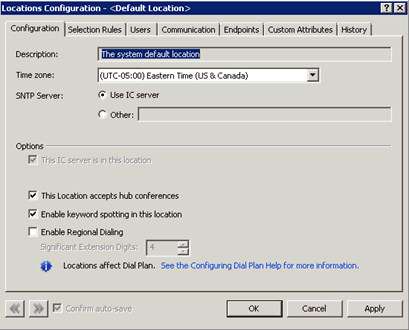
-
-
Repeat steps 1 through 3 for the other locations configured in the Regionalization container.