


- Contents
Genesys Cloud for PureConnect Administrator's Guide
Genesys Cloud for PureConnect requirements
The Genesys Cloud for PureConnect integration is a requirement for all Genesys Cloud for PureConnect features and the Genesys Cloud Conduit for PureConnect. The integration itself is free to PureConnect customers.
Extra requirements, licensing, fees, and configuration settings apply to advanced features, Single Sign-On Genesys Cloud, and Workforce Engagement. For more information, see:
CIC requirements
Genesys Cloud for PureConnect integration requires CIC 2016 R3 or later.
-
Advanced features like Co-browse and the web-based phone require later versions of CIC.
-
Genesys Cloud Workforce Engagement Management features require CIC 2021 R1 or later.
Note: Workforce Engagement features are available in 2021 R1 only in a pilot program for selected customers. To learn more about this piloting program, contact your Genesys account manager.
-
Genesys Cloud Inbox Notifications require CIC 2020 R4 or later.
-
Sync Advanced Platform Objects (workgroups, wrap-up codes, and skills) requires CIC 2020 R2 or later.
-
Enabling PureConnect as a Genesys Cloud SSO (single sign-on) provider requires CIC 2020 R2 or later.
-
The web-based phone feature requires a Genesys Cloud Edge server on the customer’s premises.
Note: The currently available Genesys Cloud for PureConnect features are supported both for on-premises and PureConnect Cloud.
Genesys Cloud organization
Your CIC server can integrate with only one Genesys Cloud organization. Your Genesys Cloud organization is created for you. You receive a welcome email to activate your admin account in Genesys Cloud.
Note: You can configure the Genesys Cloud organization used for Workforce Engagement Management only on a single switchover pair. Configuring this organization on multiple servers is not supported.
The Genesys Cloud organization is provisioned with the following:
-
The base functionality required for your Genesys Cloud integration.
-
An admin console you can use to configure your Genesys Cloud integration.
-
A user with the Genesys Cloud Admin role, which includes default admin permissions, single sign-on, and any integration-specific permissions.
Make a note of these items in your Genesys Cloud organization:
-
Administrator email address
-
Administrator password
-
Organization short name – generated from the organization long name, in compliance with DNS restrictions (a-z, 0-9, A-Z)
-
Region
Note: If you are unsure of the organization short name, log in to Genesys Cloud and navigate to Admin>Account Settings>Organization Settings. Both the organization long name and short name appear there.
PureCloudAdmin user
Before you configure Genesys Cloud for PureConnect, create the PureCloudAdmin user in Interaction Administrator. The Genesys Cloud organization administrator's name can be the same or different.
Note: Previous versions of this integration created this user automatically. If the PureCloudAdmin user exists, you can continue to use it.
Important! The CIC system employs the PureCloudAdmin user for the connection to Genesys Cloud and the associated Genesys Cloud Bridge connectors. The Genesys Cloud Bridge connectors use the PureCloudAdmin user credentials to establish the connection to the CIC server. Do not modify or delete the PureCloudAdmin user.
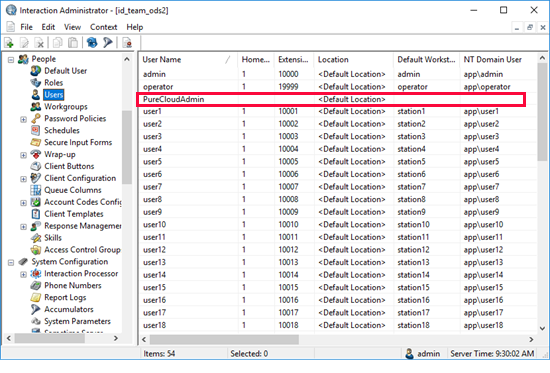
PureConnect Users
To sync properly, Genesys Cloud for PureConnect requires that PureConnect user accounts have the following information configured in the Users container:
-
Personal Info tab>Internet tab>Business Email
Note: If a user does not have a business email address, the integration does not sync that user to the Genesys Cloud organization.
We recommend you supply a display name.
-
Personal Info tab>General tab>Display Name
Note: If you do not supply a display name, it defaults to the user name. A display name makes the user easier to identify in Genesys Cloud. If you later add a display name, the integration updates the Genesys Cloud information.
After you configure the integration, Auto generated custom attribute PureCloudWebRTCExtension value should never be changed manually unless told by Genesys.
We recommend that you configure the required (and optional) CIC user information before you configure Genesys Cloud for PureConnect. However, if you configure more users after you configure Genesys Cloud for PureConnect, the integration automatically syncs them for you.
User passwords
If agents and administrators use Genesys Cloud for PureConnect integration, they do not need a Genesys Cloud password.
However, if a user chooses to log on manually to Genesys Cloud without using the integration, the user must create a Genesys Cloud password. CIC user passwords are separate from Genesys Cloud user passwords. These user passwords can be different. If a user chooses a different password in Genesys Cloud, it does not affect their ability to log on to any CIC client.
Note: CIC does not recognize Genesys Cloud roles. Genesys Cloud does not recognize CIC user security settings.
Genesys Cloud Bridge considerations
The Genesys Cloud for PureConnect configuration installs Genesys Cloud Bridge on the CIC server. Genesys Cloud Bridge manages the data transfer between the CIC server and Genesys Cloud.
Note: As of CIC 2019 R4, the Genesys Cloud for PureConnect integration no longer supports off-server bridges.
Switchover
Note: The Genesys Cloud Workforce Engagement for PureConnect functionality is being released in multiple phases as part of the pilot program. The pilot program functionality in 2021 R1 now supports switchover.
Configuring this integration on the active server in a Switchover pair automatically installs Genesys Cloud Bridge on both the active and backup servers. The bridge operates independently from the active and backup CIC servers.
-
If the backup server is unavailable when you configure this integration, it installs the bridge on the backup server the next time you start CIC.
-
If the primary CIC server stops, but the computer itself is healthy and running, then the bridge on that computer automatically talks to the new Primary CIC server after the switchover completes.