


- Contents
PureConnect Reporting Technical Reference
Connection String Formats
The reporting plug-in parses the connection string in the Additional
Information field on the ODBC Data Source Configuration page
to identify the host and port number for the tunnel connection. The IC
Setup Assistant automatically sets the connection string in the Additional
Information field. To view the Additional Information field, select
IC Data Sources> < Data source >
IC Data SourceConfiguration > Report Connection
Configuration.
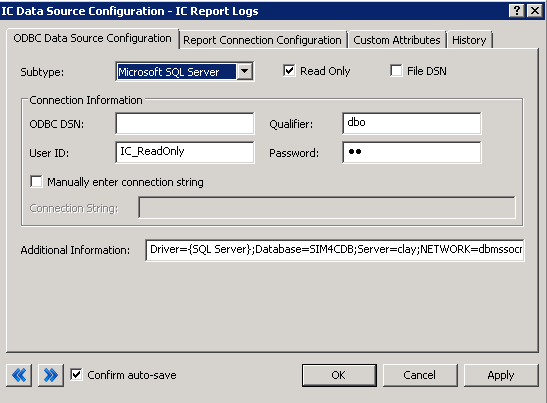
The following table contains example connection strings that the reporting plug-in can resolve.
Note: If the connection string contains the optional ENCRYPT=TRUE parameter on the connection string, the reporting plug-in does not scan the incoming cipher text for SQL injection attacks.
|
DBMS Platform |
Connection String Example |
|
SQL Server |
Driver={SQL Server};Database=I3_IC;Server=dbserver;NETWORK=dbmssocn;Trusted_Connection=No Note: Connect to default SQL server instance on dbserver by using the default port. |
|
SQL Server |
Driver={SQL Server};Database=I3_IC;Server=dbserver\instance;NETWORK=dbmssocn;Trusted_Connection=No Note: Connect to a named instance of SQL server.SQL Browser Service must be running on dbserver and firewalls must allow UDP communication to port 1434. |
|
SQL Server |
Driver={SQL Server};Database=I3_IC;Server=dbserver;PORT=62413;NETWORK=dbmssocn;Trusted_Connection=No Note: Connect to an unnamed instance of SQL server on dbserver by using port 62413.Use this string if security restriction prevents SQL Browser resolution of named instances. |
|
SQL Server |
Driver={SQL Server};Database=I3_IC;Server=dbserver,62413;NETWORK=dbmssocn;Trusted_Connection=No Note: Connect to an unnamed instance of SQL server on dbserver by using port 62413. Use this string if security restriction prevents SQL Browser resolution of named instances. |
|
Oracle |
Driver={Oracle};DBQ=tnsnameofdatabase; Note: Only use a connection through TNS name resolution for Oracle.Set the ORACLE_HOME environment variable before starting the CIC server or the off - server Session Manager so that TNS resolution works. |