


- Contents
PureConnect Reporting Technical Reference
Report Print Tool
The report print tool is used to output to a printer, or to file via the printer drivers. A blank printer name will output to the default printer. If printing to file, no automated cleanup of the files will take place. Either automated or manual cleanup routines will have to be executed to remove any files after they have been used.
When CIC runs as a service, care must be taken to ensure that the printers being used are accessible by the service. Services either have to be given specific user privileges, or devices need to have printing rights granted to everyone to ensure that printing is possible. Also, the full path to the printer as seen on the Printer Properties/Security/Permissions will likely have to be used unless the printer is local.
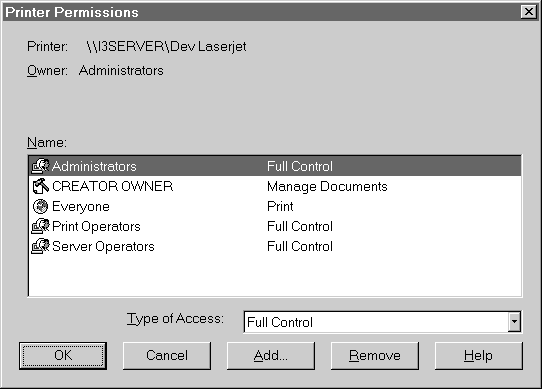
The Printer Permissions dialog box shows specific user privileges.
|
Report
Print Tool |
||
|
Input |
Allowed Values |
Explanation |
|
Report Name |
Identifier Name of Report configured in Interaction Administrator |
This is the report definition that will be used to process the requested report. |
|
Printer Name |
Valid name of printer accessible from server. |
Printer name used for output. A UNC path might be required to correctly address the printer if it is a network printer. If no printer name is supplied, the default printer will be used. |
|
Number of copies |
Empty to 65000 |
Tells print engine number of copies to print. Value defaults to one if nothing is supplied. |
|
Starting output page |
Empty or 1 to maximum number of pages in document |
Specifies the starting page of output. If nothing is supplied, 1 is assumed. |
|
Ending output page |
Empty or 1 to maximum number of pages in document. |
Specifies the ending page of output. If nothing is supplied then the last page is assumed. |
|
Collate Flag |
Empty, or true or false |
If empty, the printer will collate by default. |
|
String Parameter Names |
List of Parameter Names |
List of strings specifying the names of the string user parameters for the report. |
|
String Parameter Values |
List of String values |
List of strings specifying the value for each of the parameters named in the String Parameter Values list. They must match 1 for 1 with the String Parameter Names list. |
|
Datetime Parameter Names |
List of Parameter Names |
List of strings specifying the names of the datetime user parameters for the report. |
|
Datetime Parameter Values |
List of Datetime values |
List of datetimes specifying the value for each of the parameters named in the Datetime Parameter Names list. They must match one for one with the Datetime Parameter Names list. |
|
Number Parameter Names |
List of Parameters Names |
List of strings specifying the names of the number user parameters for the report. |
|
Boolean Parameter Values |
List of Boolean values |
List specifying the values of the Boolean parameters for the report. |
|
Number Parameter Values |
List of Number values |
List of numbers specifying the value for each of the parameters named in the Number Parameter Names list. They must match one for one with the Number Parameter Name list. |
|
Print File |
Valid path file name |
Forces output to be printed to this file. This can be used to create PostScript output or to print to file from the Fax Printer to create a file that can be processed for faxing. If no path is supplied, the file will be placed in the CIC work directory if one exits, or the temp directory, or the root of the C: drive. |