


- Contents
CIC Text to Speech Engines Technical Reference
Interaction Designer Tools for Interaction Text to Speech
You can use the following Interaction Designer tools with Interaction Text to Speech when Interaction Media Server is set as the default Text-to-Speech provider:
|
Play tools |
Record tools |
Play prompt tools |
|---|---|---|
|
|
|
Interaction Text to Speech with SAPI or MRCP TTS as default
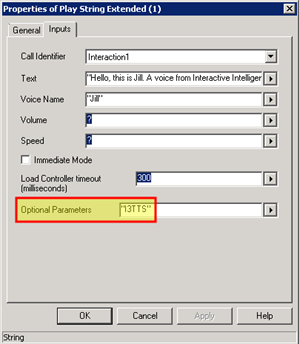
If you use SAPI or MRCP, you can still configure these tools to use
Interaction Text to Speech by specifying an optional parameter, "I3TTS",
in the properties for that tool step:
You can also specify other parameters to control various characteristics of the synthesized speech of Interaction Text to Speech.
Note:
To use multiple parameters, use a space between each parameter in
the Optional Parameters box. Separate parameters
from values with a colon (:). You must use double quotation
marks around the entire string of characters. For example, "I3TTS
i3tts.content.language:text/plain".
|
Parameter |
Values |
Description |
|---|---|---|
|
I3TTS |
N/A |
If Interaction Text to Speech is not selected as the default TTS provider, use this parameter to set Interaction Text to Speech as the TTS provider. Note: Specify this parameter before any other parameters. |
|
i3tts.content.language |
Language values as specified in RFC 3066 |
Use this parameter to specify the language for ITTS to use to synthesize the text. |
|
i3tts.content.type |
|
Use this parameter to specify the content type of the text for ITTS to synthesize. |
|
i3tts.voice.name |
ITTS voice to use for the specified language. |
Use this parameter to specify the i3tts voice for ITTS to use to synthesize the text. ITTS uses the following voices for the supported languages:
|
|
i3tts.voice.rate |
|
Use this parameter to specify the SSML prosody rate of the selected ITTS voice. |
|
i3tts.voice.volume |
|
Use this parameter to specify the SSML prosody volume of the selected ITTS voice. |
|
i3tts.voice.pitch |
|
Use this parameter to specify the SSML prosody pitch of the selected ITTS voice. |