


- Contents
- Index
Interaction Scripter Client User's Guide
Call Disposition buttons
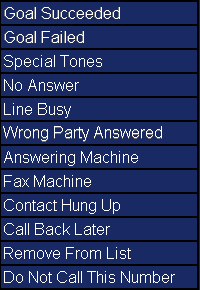
Call disposition buttons make it easy to close out (disposition) the current call. For example, if a call reaches an answering machine, the agent presses Answering Machine to hang up and reenter an available status.
Call disposition buttons are inactive unless the agent is connected to a party. The buttons highlight automatically as the cursor passes over them. This makes it easier to see which button is selected.
These buttons record whether or not the call reached the contact, and whether or not the campaign objective was met.
Only one disposition button may be pressed per call. Most calls are disconnected immediately once a call disposition is selected.
If you select Call Back Later, the call is disconnected when the callback is successfully scheduled. If you transfer a call, you are disconnected from the contact when OK is pressed after selecting a destination user, station, workgroup, station group, or Attendant profile.
This is a placeholder for topic contents.