


- Contents
- Index
Interaction Attendant Help
Caller Data Entry Error Handling Options Dialog
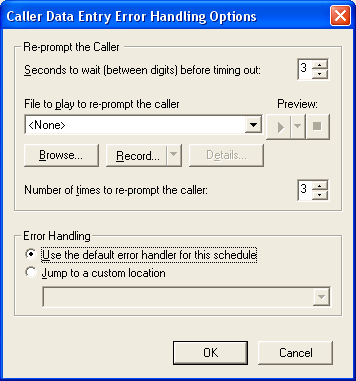
This dialog appears when the Advanced Error Handling button is pressed from a Caller Data Entry form. It defines optional error handling that works in addition to the error handling provided by a Schedule form.
Use this dialog to define the maximum length of time that Interaction Attendant should wait for caller data entry keystrokes before timing out and re-prompting the caller to start over. It also establishes the maximum number of times that the prompt will be repeated before control is passed to the Schedule's error handler, or to a profile, schedule, menu, or operation defined for the current server.
Re-prompt the Caller
Seconds to wait (between digits) before timing out spin control
This control sets the maximum amount of time that Interaction Attendant will wait between digit presses. There is an initial timeout of 20 seconds if no digits are pressed.
File to play to re-prompt the caller (embedded audio controls)
These controls manage the voice prompt played if users are re-prompted to enter digits. See Manage Voice Prompts for information about voice prompts.
Number of times to re-prompt the caller spin control
This spin control determines the number of times that the prompt will be repeated before control is passed to Error Handling. If this value is set to zero, Attendant does not re-prompt, so it is good practice to set this value to 1 or higher.
Error Handling
Error Handling options execute when a timeout occurs after the user has been re-prompted the maximum number of times.
Use the default error handler for this schedule
Passes control to error handling provided by the Schedule form that this caller data entry node is attached to.
Jump to a custom location
Passes control to the any profile, schedule, menu, or operation that is defined for the current server.