


- Contents
- Index
Interaction Analyzer Technical Reference
Interaction Analyzer integration
Interaction Analyzer is not an independent product. It is a feature that is integrated in multiple products within the Customer Interaction Center suite. The following diagram displays how the different products cooperate to provide the functionality and robustness of Interaction Analyzer.
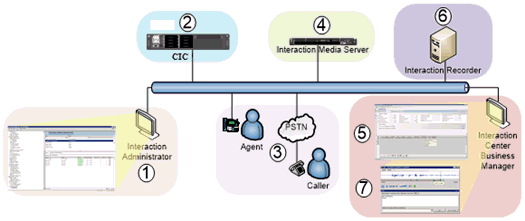
The following table describes each step in the Interaction Analyzer process:
|
Item |
Description |
|---|---|
|
1 |
Using the Interaction Analyzer interface in Interaction Administrator, you define your keywords and phrases. Through this interface, you also enter user-defined pronunciations, anti-spellings, and confidence thresholds. You configure what interactions are analyzed and what keyword sets are used through the Interaction Recorder Policy Editor interface in Interaction Administrator. |
|
2 |
The keyword sets and policies are stored on the Customer Interaction Center server. |
|
3 |
A call enters or is placed within the contact center. Interaction Recorder searches existing policies to see if the call should be recorded, if it should be analyzed, which keyword sets are used. |
|
4 |
Interaction Media Server begins recording the call and analyzing the conversation, looking for defined keywords. |
|
5 |
Using IC Business Manager, a contact center supervisor can watch interactions in real time and monitor the weighted scoring of each interaction. If necessary, the supervisor can listen to or take part in problematic calls. |
|
6 |
When the call completes, Interaction Recorder archives the recording to a file server. |
|
7 |
Using the Interaction Recorder Client interface in IC Business Manager, the supervisor reviews interactions and sees where defined keywords and phrases were spoken in the interaction. |