


- Contents
- Index
Siebel Integration Installation and Configuration
Adding status data to Siebel’s reason code list of values
CIC agents can use configurable status messages to specify their status, such as “Available” or “At Lunch.” Using Siebel’s reason code, Siebel agents can select CIC statuses.
The following figure shows the CIC status data to add to Siebel’s Reason Code List of Values.
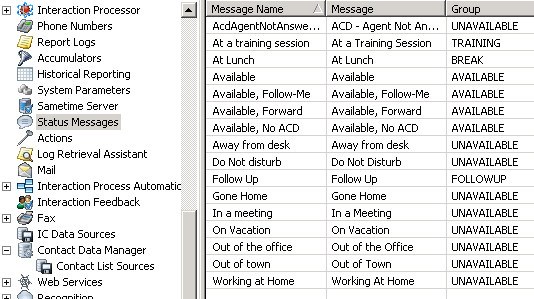
To add status messages to Siebel’s Reason Code List of Values:
-
Log on to Siebel as a Siebel Administrator and press Ctrl+Shift+A to open the Site Map.
-
Select the Administration – Data tab and choose the List of Values link.
The LOV [List of Values] window appears.
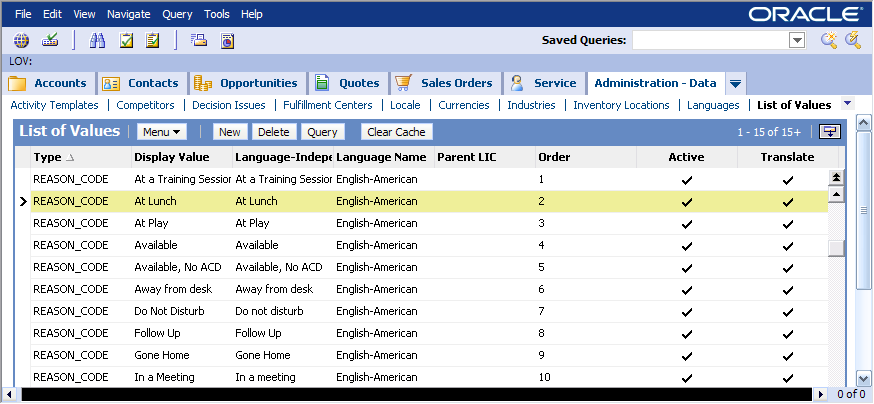
-
Click Query.
-
In the Type column type REASON_CODE*. Then click OK.
The query is completed.
-
Click New.
-
In the Type column, type REASON_CODE.
-
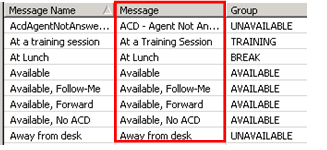
In the Display Value column, type the corresponding status from the Message column in the CIC status data.
-
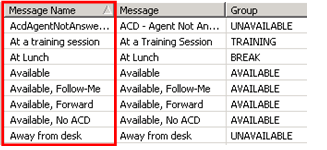
In the Language Independent Code column, type the corresponding status from the Message Name column in the CIC status data.
-
In the Language Name column, select the appropriate language for reason codes.
-
In the Order column, type the number that indicates the sequence of the reason code relative to the other reason codes in the list.
-
Click the Active column.
-
Repeat steps 3-9 for each additional status.