


- Contents
- Index
SSO Identity Providers Technical Reference
Configure Salesforce as an Identity Provider
When you configure Salesforce as an identity provider in Configure identity provider settings in Interaction Administrator, you must provide some specific information:
-
On the Configuration tab of the Identity Provider Configuration dialog box:
-
For UI Display, select Allow user to specify username and password.
-
For Authentication Type, select either SAML 2 Web Browser Post or SAML 2 Web Browser Redirect.
-
Depending on the authentication type, enter the following URL address in the Endpoint box:
|
Authentication type |
URL |
|
HTTP Post |
https://ExampleDomain.my.salesforce.com/idp/endpoint/HttpPost |
|
HTTP Redirect |
https://ExampleDomain.my.salesforce.com/idp/endpoint/HttpRedirect |
ExampleDomain is an example of your Salesforce subdomain.
-
When adding assertion claims from the identity provider (Salesforce) on the Claims tab of the Identity Providers dialog box:
-
In the Assertion box of the New/Edit Claim dialog box, enter the claim assertion value that the Salesforce identity provider includes in the SAML Web Browser POST AuthnResponse message.
You map that assertion value to a CIC user attribute. Usually, the assertion value is email or username.
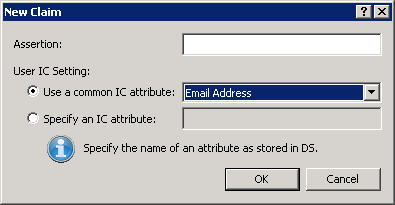
-
Select the Use a common IC attribute option and, then, select Email Address in the associated list box.