


- Contents
- Index
PureConnect Licensing Technical Reference
Activation File Management Tool
The Activation File Management tool allows you to manage and configure your PureConnect product licenses. It replaces the License Management System for PureConnect products. Customers can access the tool on the My Support Dashboard at https://genesyspartner.force.com/customercare/GenesysCommunityLogin. Partners can access the tool on the Partner portal at https://genesyspartner.force.com/partner/Home. You must have the appropriate credentials to access these portals.
Note: You can also use the Genesys Activation File Request Tool to communicate with the Genesys Licensing Team about licensing related issues or to request an activation file. The tool is available at https://genesys.secure.force.com/activationfile and doesn’t require logon credentials. Follow the instructions on the web site to submit a question or request.
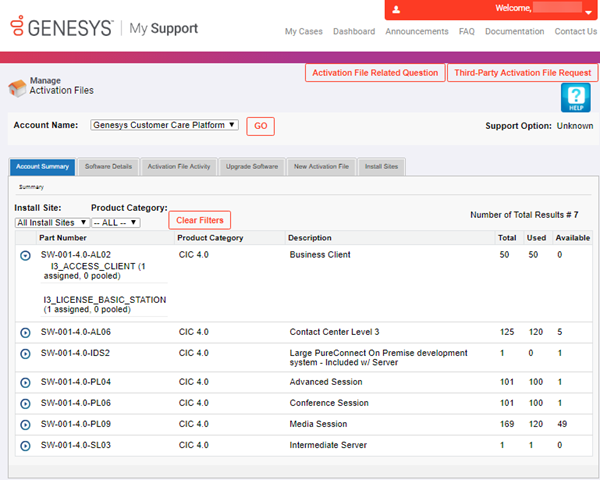
Activation File Related Question: Opens the Activation File Related Question page to allow you to ask a license-related question or request an activation file.
Third-party Activation File Request: Opens the Third-Party Activation File Request page to allow you to submit a third-party license request.
Help: Open the Activation File Management Tool Guide, which provides an overview of the tool.
Account Name: Account for which to view licenses.
Tabs