


- Contents
Microsoft Lync Server Integration Administrator's Guide
Set up TLS and MTLS
If you configured the Lync gateway using TLS inConfiguring Lync Server:
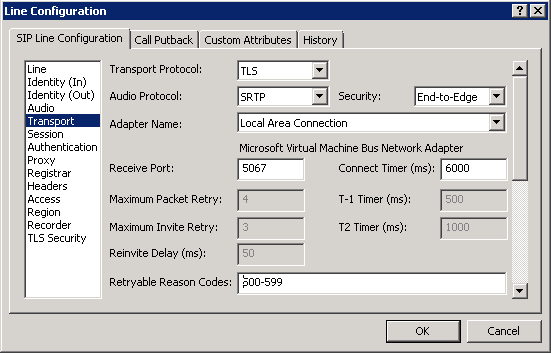
-
On the Lync Server, export the CIC server's Trusted Certificate, including all Certificates in the Certificate Path to include the Root CA Certificate. Export it in PKCS#12 (.PFX) format. Export the private key also.
-
On the CIC server, you need to extract the Public and Private Key. This can be completed by using openSSL or ssl_app-w32r-1-2.exe:
-
Extract the private key:
ssl_app-w32r-1-2.exe pkcs12 -in <pfx_file_name>.pfx -nocerts -nodes -out priv.pem
-
Extract the public key:
ssl_app-w32r-1-2.exe x509 -inform pem -in privpub.pem -pubkey -out pub.pem -outform pem
-
-
If checking the Require mutual authentication (MTLS) check box, make sure the certificate that Lync uses to connect to CIC has Client Authentication X509 Extended Key Usage (client EKU). Instructions for how to configure this in Lync can be found in the following articles:

-
Import the Line Authority Certificates in CIC.
-
In Interaction Administrator, choose System Configuration, Certificate Management, and Authority Certificates.
-
Add the root Certificate Authority (CA) and all the intermediate CA certificates used to sign the Lync certificate.
-
-
On the Port-To-Certificate Mappings tab, click Add. Choose the CIC server Certificate created on the Lync Server and select Port: 5066 (the port we chose for the Lync line).