


- Contents
Regionalization and Dial Plan Technical Reference
Classification categories
In the old dial plan, classification strings (for example, Emergency and Intercom) were visible in the dial plan table and they were literally used in some handlers to identify types of calls. This process did not support localization (in other languages) very well, so to abstract these classification strings for grouping similar classifications, and to support localizing these strings, classifications categories have been added to the regional dial plan. A distinction has been made between the actual category name and the display string, which can be translated. So instead of handlers depending on the classification string name, it bases its logic on the classification category.
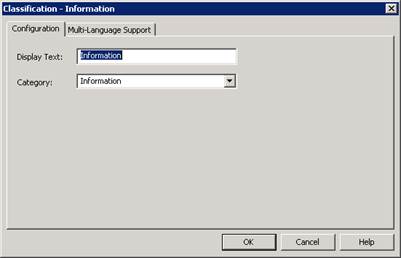
Genesys recommends that you not change or remove the default classifications and categories in the base dial. You can change the display text, but the default handlers and functionality rely on the default classification categories.
PureConnect uses classification categories to determine if a user is allowed to make a call by matching the resulting classification category for the input pattern with the list of classification categories configured for the user, role, workgroup, and so on, under the Phone Number – Classifications category on the Access Control tab in the People container.
Additional classifications
In addition to the phone number classifications on the Access Control tab in Interaction Administrator, there is now support for additional classification lists which allow you to set different call rights for a user:
-
Classifications Forward – This classification list specifies the types of calls (for example, intercom and local) that can be forwarded successfully.
-
Classifications Follow-Me – This classification list specifies the types of calls that can be transferred to different numbers using follow-me routing.
-
Classifications TUI – This classification list specifies the types of calls that can be forwarded from the voicemail TUI.
Users are not prevented from setting numbers that don’t match the specified call types, but those numbers will result in insufficient dialing privileges when attempted and calls will roll over to voicemail.
To invoke these additional classifications, you must define custom attributes in Interaction Administrator, with the classification as the attribute name and a pipe-delimited list of the allowed classifications as the value.
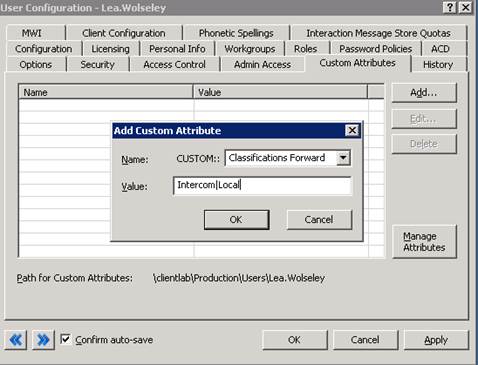
The custom attributes override the default classification list. For more information about defining custom attributes, see Custom Attributes topic in Interaction Administrator Help.
Handlers will automatically populate the custom attributes the first time a user has one of these dialing instances with the classifications in their regular dialing list. To limit the classifications, simply remove any unwanted classifications from the pipe delimited list in the custom attribute.