


- Contents
Interaction Dialer Manager Help
Define Phone Number Types
To define phone number types:
-
From Dialer Manager, open the Advanced Interaction Dialer container and click Global Dialer Settings.
-
Select the Phone Number Types tab.
-
Click the Add (
 ) button.
 -
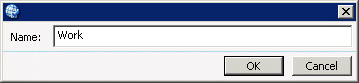
When you are prompted for a new phone number type, enter a descriptive string, which can be anything you like so long as it is unique.
-
Click OK.
Repeat steps 3-5 to define additional phone number types, as needed.
-
Click Save.