

- Contents
Phone Feature Configuration of Polycom Phones Technical Reference
Zone Page
Make Zone page allows a user to make a live, one-way broadcast to a small, selected group of phones.
A user dials a short sequence of numbers (*901 + zone
number) to start a zone page. After hearing a beep, the user speaks
into the handset to begin the page. The zone page recipients hear it through
the speakers on their phones and do not have to pick up a handset.
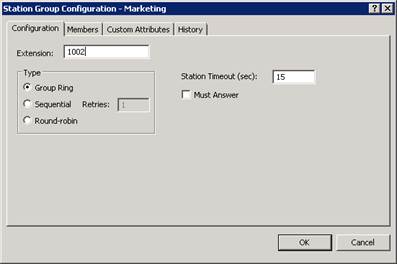
Note: The Zone Page feature is automatically available for managed phones. However, to use these extensions as zone numbers, you need to configure CIC station group extensions, workgroup extensions, user extensions, or station extensions in Interaction Administrator.
Other zone page features include:
-
Zone numbers are CIC station group extensions, workgroup extensions, user extensions, or station extensions.
-
A zone page cannot interrupt another zone page. If a phone is playing a page and someone attempts to page a group that includes that phone, the phone does not interrupt the first page for the second page.
-
If an intended recipient is already using the phone at the start of a zone page, the zone page does not play on the speaker for that phone.
Limitations
Zone page is supported only on Polycom phones.
At sites with poor network performance, a significant delay can occur before some stations receive the page. In an environment where the listener can hear more than one phone at a time, a noticeable echo between the broadcasting phones can occur.
Zone paging causes the phones to go "off hook" before accepting the page. The more phones there are in a zone, the greater the delay before the page is broadcast. Zone paging is not intended for live paging to an entire organization. It is intended for paging to a small geographical zone in the office or to a small group.
Polycom configuration settings for Zone Page
To receive a zone page, the phones must go off hook automatically.
Configure this setting in the Alert Information (<alertInfo/>)
section of the xIC.cfg file. The alertInfo value
is a string that is compared against the Alert-Info value
in the SIP message header. If there is a match, the behavior described
in the ring class occurs. Ring class 3 auto-answers the incoming call.
In the xIC.cfg file, set the alertInfo value
to http://localhost/AutoAnswer and its class to 3.
    <voIPProt
    <SIP
    <alertInfo VoIpProt.SIP.alertInfo.1.value="<http://localhost/AutoAnswer>"


 voIpProt.SIP.alertInfo.1.class="3" />
Interaction Administrator configuration settings for Zone Page
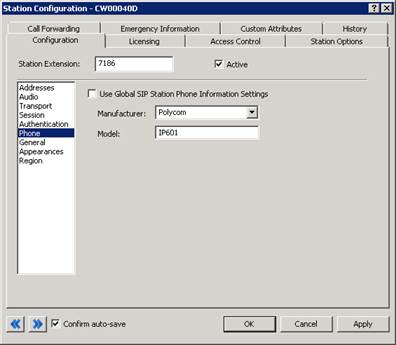
On the Phone page in the Configuration tab of Station Configuration, set Manufacturer to Polycom and Model to the appropriate Polycom model number. This configuration makes auto answer work with zone page and dialing through the CIC client.
Setting Manufacturer to Polycom instructs
CIC to include an Alert-Info field in the SIP header. The
value of Alert-Info is set to http://localhost/AutoAnswer.
Because zone numbers are CIC station group extensions, workgroup extensions, user extensions, or station extensions, you do not need to create special zone numbers in order to use zone paging. For example, you can create station groups that correspond to physical locations (zones) in your office and add or delete members. For more information about maintaining the appropriate extensions, see the Interaction Administrator Help at https://help.genesys.com/cic/mergedProjects/wh_ia/desktop/interaction_administrator_help.htm. Ensure that you specify an extension for any group that you intend to page.