- Contents
Interactive Update Technical Reference
Display details for a status and a machine
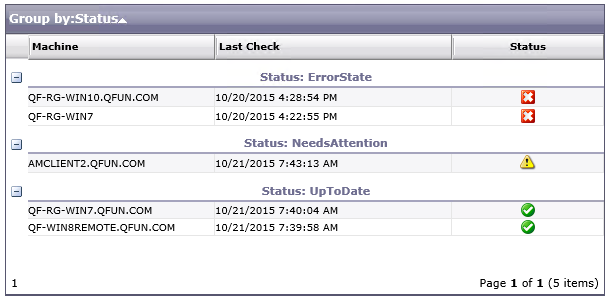
The report grid contains the details for the report. Use the report grid to display:
-
Machines with a specific status.
-
Information about the status and the installed applications for the specific machine.
To display machines with a specific status, double click a row to expand a section.
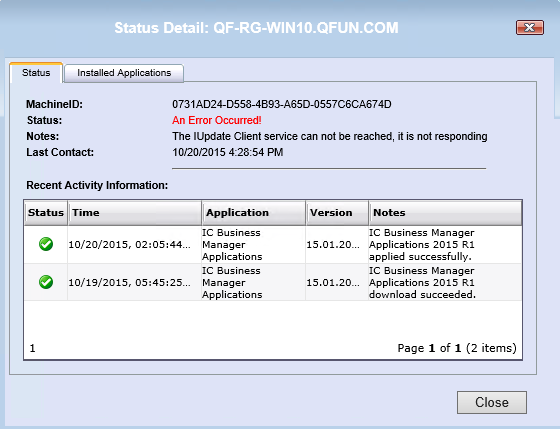
To display information about a machine, double-click a machine name in the Machine column. The Status Detail dialog appears. The Status tab contains the machine ID, the status, notes to provide an additional description about the status, and the date and time of last contact. The Status tab also contains recent activity information similar to the activity log. The following example, illustrates the Status tab for a machine with an error.
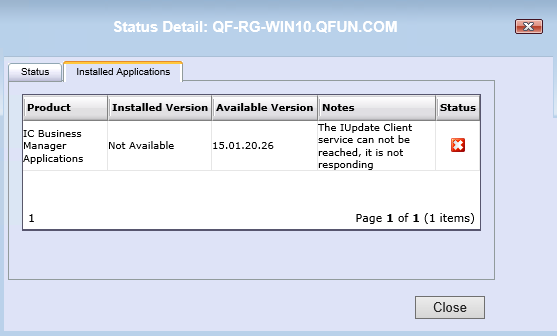
The Installed Applications tab indicates the installed products for a machine. For each product, the Installed Applications tab indicates the version currently installed, the version available from the provider to install, and the status for that machine. For an ErrorState status, the Notes column contains additional information about the error. For the UpToDate status, the version in the Available Version column matches the version in the Installed Version column. For the NeedsAttention status, the version in the Available Version column does not match the version in the Installed Version column.