


- Contents
Tokenizer Configurator Help
Create the Tokenizer Database
Use the Database Type section of the Secure CC Storage Configurator window to create the Tokenizer database.
To create the Tokenizer database
-
Locate the Database Type section of the Secure CC Storage Configurator window.
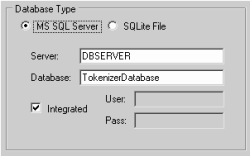
Database Type: Click MS SQL Server. Only click SQLite File for a test database. For more information, see Create a SQLite Test Database.
Server: Name of the Tokenizer database server.
Database: Name of the Tokenizer database.
Integrated: If selected, the system uses SQL Server's integrated security to access the Tokenizer database. If cleared, the system uses the standard security credentials.
User: User ID for accessing the Tokenizer database. Provide this information if you cleared the Integrated check box.
Pass: Password for accessing the Tokenizer database. Provide this information if you cleared the Integrated check box.
-
Complete the information and then continue to the next step in the checklist.