


- Contents
- Index
Overview of Credit Bureau Reporting Console Window
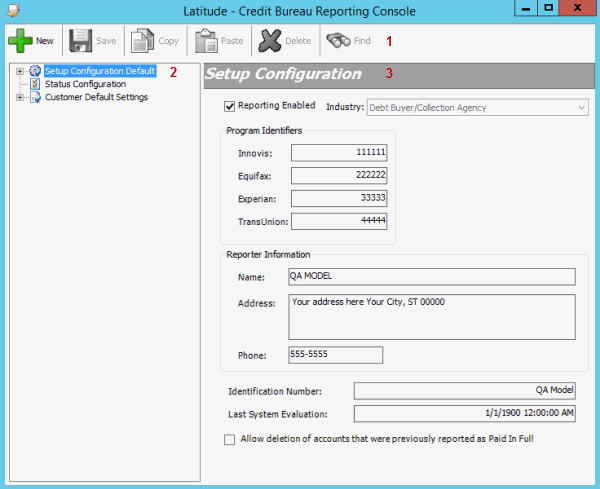
Use the Credit Bureau Reporting Console window to create and maintain the configuration for reporting accounts to credit bureaus. The system applies specific configurations as defaults to customers within a defined Class of Business, and to individual customers. There are three configuration sections:
-
Setup Configuration: Allows you to specify identifying information for your agency when reporting accounts to a credit bureau.
-
Status Configuration: Allows you to view or modify the method for reporting accounts assigned to a specific status.
-
Customer Default Settings: Allows you to specify settings to apply to all customer accounts that do not have specific customer configuration settings applied.
-
Menu bar: Displays submenus and commands for Credit Bureau Reporting Console.
-
Navigation pane: Displays configurations and their associated settings. If you click a configuration group in the Navigation pane, the configuration settings for that configuration group appear in the Information pane. If you expand a configuration group, its associated configurations appear beneath it.
-
Information pane: If you click a customer group in the Navigation pane, the configuration settings for that customer group appear in the Information pane. If you expand a configuration group in the Navigation pane, and then click a configuration, the configuration settings appear in the Information pane to allow you to modify the information.
Related Topics
Introduction to Credit Bureau Reporting Console