


- Contents
Search for an Account
Use the Simple Search tab in the Latitude Search - Search for Account window to do simple searches for accounts. You can search using any combination of search criteria. In some cases, you can search phonetically or using a wildcard. You cannot, however, combine simple and advanced search criteria to do a search.
To search for an account
-
In the Main Menu window, click Work or press Alt + W. The Work Form appears. The Work Form appears.
-
Do one of the following:
-
Press Ctrl + F.
-
From the Search menu, click Search.
The Latitude Search - Search for Account window appears.
-
Click the Simple Search tab.
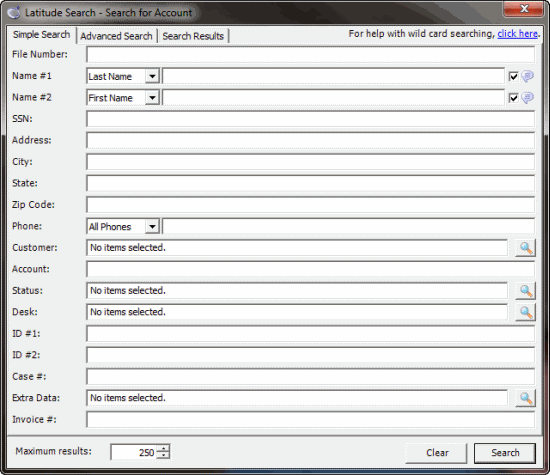
Note: The search criteria available on this tab depends on the policies set for your user account. For more information, see Permissions and Policies Overview.
-
Type search criteria into one or more boxes.
Tip: For fewer results, provide more information. For more results, provide less information.
-
Click Search. The results display on the Search Results tab. If the system doesn't find a match, it displays a message to that effect.
Tip: To clear the search criteria, click Clear, and then in the confirmation dialog box, click Yes. For more information about wildcard searching, click the click here link.