


- Contents
View POD Account Balance Information
Use the PODs View dialog box to view account balances for Particulars of Debt (POD) accounts. POD accounts use one or more entries (invoices) to indicate debt segments of principle balances.
To view POD account balance information
-
With an account displayed in the Work Form, click the PODs icon
 .
The PODs View dialog box appears.
.
The PODs View dialog box appears.
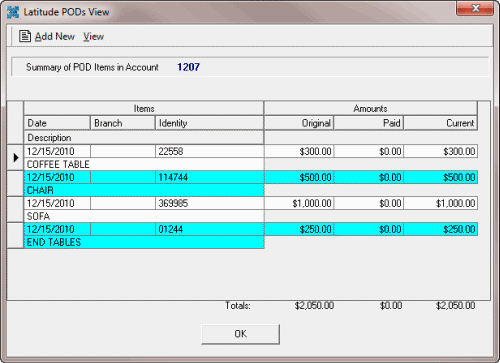
Date: Invoice date.
Branch: Branch associated to the item.
Identity: Item or invoice number.
Description: A description of the item.
Original: Original invoice amount.
Paid: Amount paid toward the balance.
Current: Current balance.
Totals: Total amounts for each of the columns.
-
To display invoices not paid in full only, from the View menu, click Only Balances Over Zero.
-
To display invoices paid in full only, from the View menu, click Only Zero Balances.
-
When finished viewing the information, click OK.
Related Topics
Maintain Dates Associated to an Account