


- Contents
Add a Result Code
Use the Result Code Properties dialog box to add a result code.
To add a result code
-
In the Main Menu window, from the Maintenance menu, click System Codes and Settings. The Latitude Maintenance window appears.
-
In the Navigation pane, double-click the Result Code folder, or right-click the Result Code folder and then click New Result Code. The Result Code Properties dialog box appears.
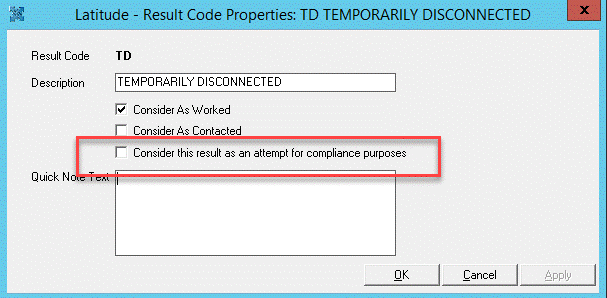
Result Code: Unique (up to) five-character code that identifies an event.
Description: Default information to appear in the note. You can add this information to a note you create using the result code.
Consider As Worked: If selected, the result code counts as work on the account.
Consider As Contacted: If selected, the result code counts as a debtor contact.
Consider this result as an attempt for compliance purposes: If selected, the result code is considered as an attempt.
-
Complete the information and then click OK.