


- Contents
Add an Extra Data Code
Use the Extra Data Properties dialog box to add an extra data code.
To add an extra data code
-
In the Main Menu window, from the Maintenance menu, click System Codes and Settings. The Latitude Maintenance window appears.
-
In the Navigation pane, double-click the Extra Data folder, or right-click the Extra Data folder and then click New Extra Data. The Extra Data Properties dialog box appears.
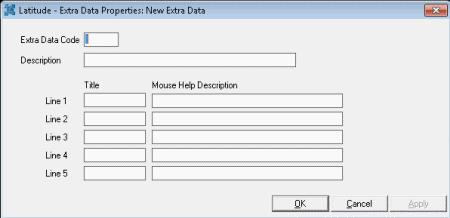
Extra Data Code: Unique two-character code that identifies the extra data.
Description: Description that appears next to the extra data code when adding extra data to a debtor Work Form.
Lines 1 through 5: You can assign up to five lines of information to associate to the code. Provide a title for the information and text that displays when a user mouse's over the title.
-
Complete the information and then click OK.