


- Contents
Edit Claim Details
Use Edit Claims to edit detailed claims information of the Carrier.
To Edit claims, do the following.
1. Click the Healthcare tab and click Edit.
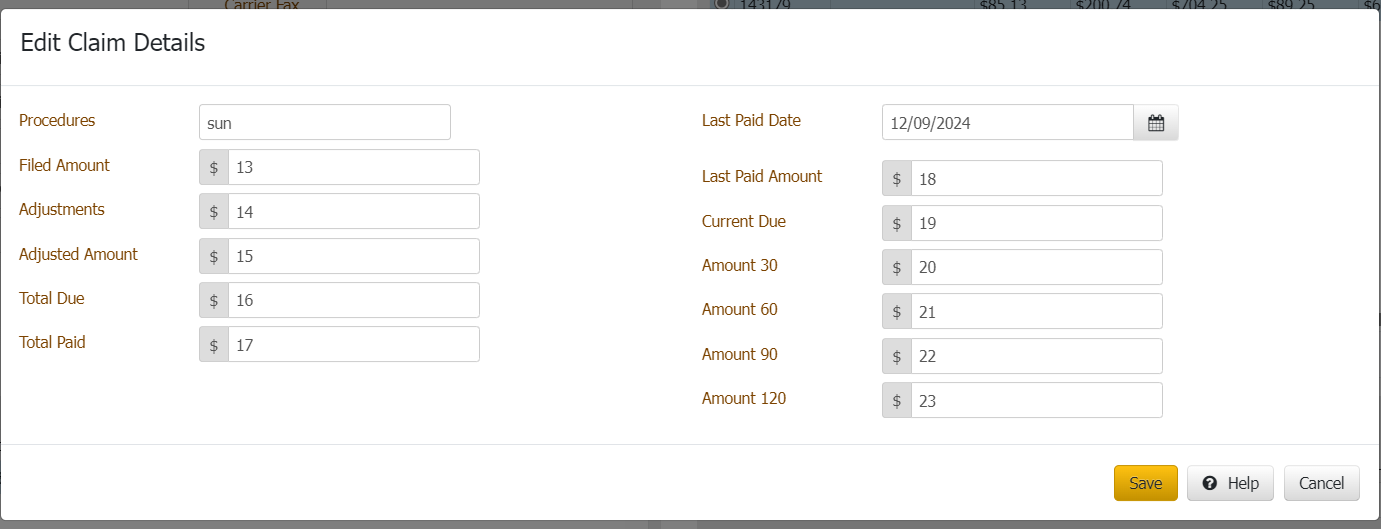
2. Edit the details you want to modify.
Procedures:
Filed Amount: Amount filed as per the carrier.
Adjustments: Amount if it is any adjustments.
Adjusted Amount: remaining amount out of filed amount.
Total Due: After calculations
Total Due: After calculations
Total Paid: Total Amount
Last Paid Date: final payment date
Last Paid Amount: final payment amount details.
Amount 30: Value of 30
Amount 60: Value of 60
Amount 90: Value of 90
Amount 120: Value of 120
3. Click Save/Update.