


- Contents
Fusion Help
Exchange Vendor Processing
Exchange handles processing of information returned from vendors using a standard client. Fusion uses the Exchange client when importing returned information. Job Manager Service can run the Exchange client as a scheduled job.
This section of the documentation provides details for standard Exchange vendor clients currently provided and the default configuration. Your organization can modify this client within Exchange or request changes from Latitude by Genesys.
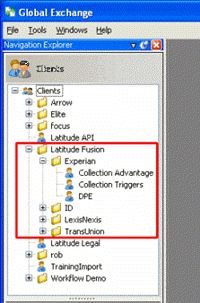
Vendor interface clients appear in the Latitude Fusion folder in the Clients tree in Exchange.
Notes:
-
Vendor service clients outlined in this document do not always match the clients available for your organization.
-
Exchange imports all returned vendor information into the services table. Users can view an account's service information account in the Work Form. For more information, see View Services Information.
-
The Latitude Fusion folder in the Global Exchange window contains the Exchange clients configured for Fusion. The Fusion Wizard creates the vendor product client when creating the first request file for the vendor product. The vendor folder contains the vendor product clients.