


- Contents
Interaction Process Automation Designer Help
The Custom Calculation Builder Toolbar
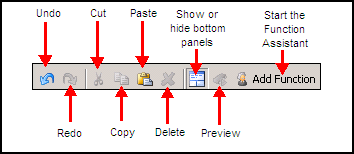
The Custom Calculation Builder toolbar (see figure) lets you do commonly-needed tasks.
-
Undo: Reverses the last change you made.
-
Redo: Cancels the last undo operation you did.
-
Cut: Deletes selected text and copies it to the Clipboard.
-
Copy: Copies selected text to the Clipboard.
-
Paste: Copies the Clipboard contents to the current cursor location.
-
Show or hide bottom panes: If the Variables / Literals and Functions panes are visible, this button hides them and expands the Calculation text box so that you have more space to enter your calculation. If the panes are hidden, this button displays them.
-
Preview: Shows the calculation as it will be interpreted by IPA Designer and sent to the CIC server. This can be important, especially in calculations that combine different data types.
-
Add Function: This starts the Function Assistant wizard.