


- Contents
PureConnect Release Notes
Interaction Dialer Compliance Improvements
This release includes compliance-related improvements to Interaction Dialer.
Policy Set/Behavior Types
When configuring the call routing behavior type for a PreCall policy type, users can now select Preview in addition to the standard routing types Normal, Precise, and Do Not Call. Selecting the Preview routing type configures the system to wait until an agent is available, presents the agent with a screen pop that includes contact information, and then places a call object in an initializing state on the agent’s queue. The system either waits for the agent to manually make the call, or, if Preview Countdown is enabled, makes the call once the time on the countdown timer elapses.
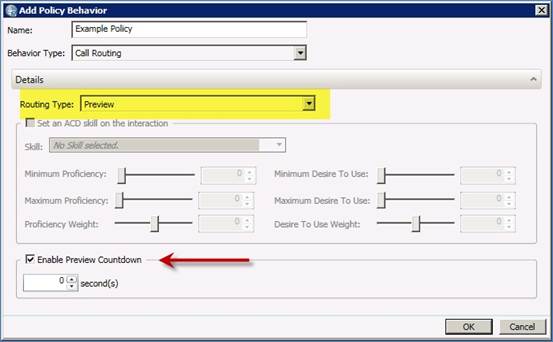
Preview routing type
Recall Control
New max attempt thresholds allow an administrator to set the maximum number of contact attempts, after which no more calls are made to the contact. This maximum is configurable on a per-record or per-number basis. Conversely, an administrator can allow an unlimited number of per-number, per-record, or per-day contact attempts.
Campaign Ownership
On the Campaign Ownership tab in the Contact List view, an administrator can configure options to ensure that multiple campaigns do not dial the same contact on a shared contact list during a configurable period of time. This is useful if multiple campaigns simultaneously use the same contact list. The first campaign to dial a number gets ownership of that record. Dialer denies access to any other campaigns that attempt to access that record.
The Action options on the same tab allow an administrator to manually release ownership of campaign records. These options are only available if the administrator has the Contact List Record Ownership Control security right.

Campaign ownership options
Custom DNC Source
A new field, Custom DNC source, appears on the Contact List tab. This field allows the administrator to specify both a custom DNC data source and a DNC.com source to simultaneously scrub contact lists. Using more than one data source is optional.
Scheduled Call History
When a scheduled callback occurs, a new callscheduletime field in the CallHistory table stores the call’s scheduled date and time.
When a call results in a scheduled callback, Dialer adds a new CallHistory record for that call. The wrapupcategory and wrapupcode fields in the record contain the word “Scheduled,” and the callscheduletime field is NULL. Then, when the scheduled callback occurs, Dialer adds a second CallHistory record for that call. The callscheduletime field in the new record contains the date and time of the scheduled call, and the wrapupcategory and wrapupcode fields contain the appropriate values.
Campaign Command Center View Enhancements
Enhancements to the Campaign Command Center view make it easier to find information with multiple campaigns displayed:
-
Color coding in the Status column indicates the status of each campaign.
-
Color coding of rows indicates which rows have the same value in the sort-by column.
-
Sortable columns include Workgroup, Campaign Mode, Priority, Campaign Progress, and Status. Sorting by the Campaign Name column displays alternating row colors because campaign names are always unique.
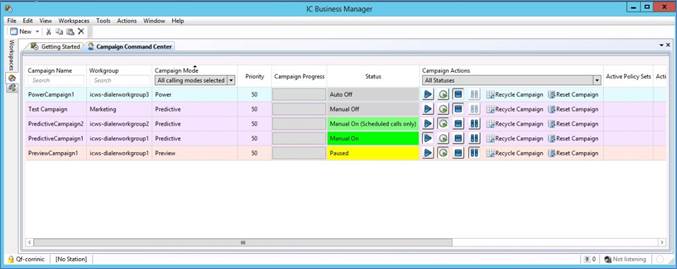
Campaign Command Center color coding
DNC.com Metadata
When scrubbing a contact list, Dialer can now access and process additional metadata from DNC.com. This metadata includes information on Calling Time Window, Calling Time Restrictions, Do Not Call Today, and Existing Business Relationship (EBR) Permission. Information about calls that are blocked based on this metadata is stored in a new searchable table. Results of blocked call searches can then be exported in a number of different formats for future use.