


- Contents
PureConnect Release Notes
Interaction Recorder Snippet Recordings
A new snippet recording feature in Interaction Recorder provides the option to initiate recording of a portion of a call or chat. This is useful when there is a need to record only a segment of a conversation, such as for the confirmation of a transaction request.
This feature helps contact centers meet specific needs for recordings. For example, many organizations require the ability to record a segment of a conversation for legal purposes. Also, some organizations require the ability to initiate a recording only after obtaining agreement from the customer.
An agent can control the point at which the recording begins or ends. Unlike with ad hoc recordings, Interaction Recorder records and manages snippet recordings. Agents can manually initiate and stop snippet recordings during a portion of a call. Handlers can also start and stop recordings.
Other features of snippet recordings:
-
A new search attribute provides the ability to locate snippet recordings.
-
Interaction Recorder supports the encryption of snippet recordings for security purposes.
-
Snippet recordings are available for quality evaluation purposes.
-
The type of recording, Snippet or Policy-based, appears in the new Recording Type column in the Search Results view.
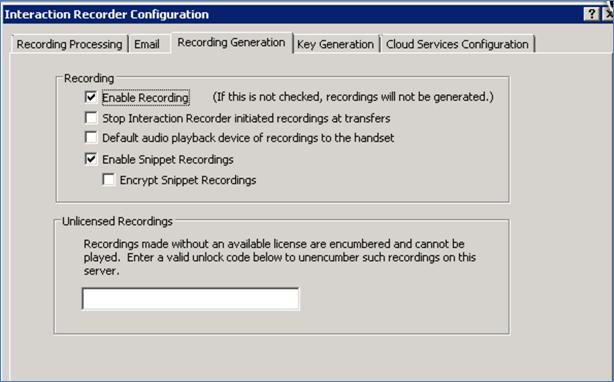
Snippet recording configuration
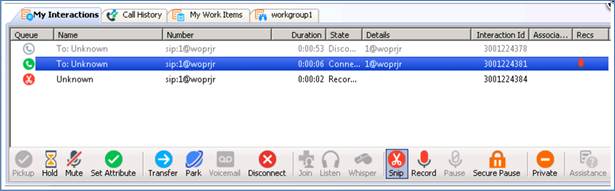
New icon to initiate and stop a snippet recording
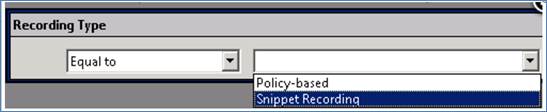
Search for snippet recordings only
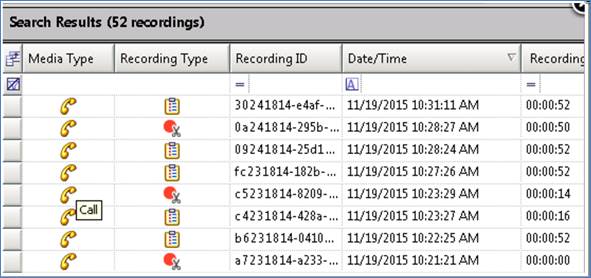
Recording type search results