


- Contents
Managed IP Phones Administrator Guide
Configure QoS Settings for RTP and SIP
The QoS value passes to manage IP phones during provisioning using the phone configuration file. The value stores as a Byte value in Interaction Administrator, and then converts to a DSCP decimal value. The value can range from 0 to 63 (decimal).
Genesys recommends that you modify the QoS values for all managed IP phone types to make client workstations compatible with other devices and systems on the network.
Configure the QoS setting for RTP (SIP station)
To configure the QoS setting for RTP packets for managed IP phones and associated SIP station audio, create one or more individual managed IP phones first.
To configure the QoS setting for RTP
-
In Interaction Administrator, open a managed IP phone in the IP Managed Phones container.
-
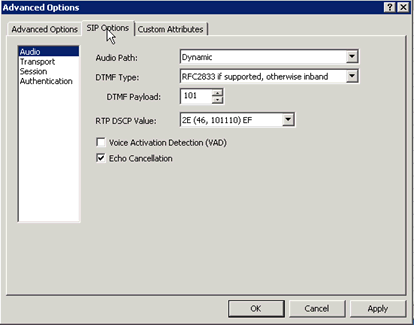
In the Managed IP Phone Configuration - Options tab, click Advanced Options. The Advanced Options - SIP Options dialog box appears, with the Audio page selected.
-
In the RTP DSCP Value box, specify the QoS setting and then click OK. The optimal setting for VoIP packets is
B8(hex), which is equivalent to a DSCP value of46. To disable DSCP tagging, set the value to0.Note:
The provisioning server reads this value and includes it in the phone configuration file.
Configure the QoS setting for SIP (SIP lines)
You can configure the QoS value for SIP globally or by individual managed IP phone.
Configure the QoS Setting for SIP (global)
To configure the QoS setting for SIP (global)
-
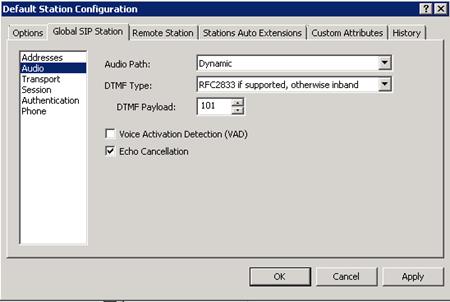
In Interaction Administrator, open Default Station Configuration in the Stations container. The Default Station Global SIP Station dialog box appears, with the Audio page selected.
-
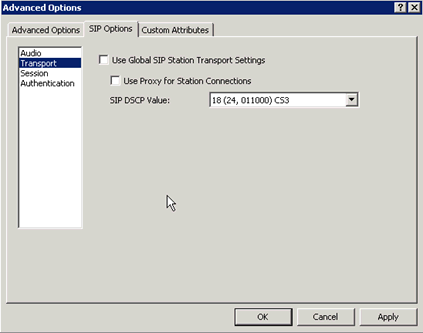
Click Transport in the left column. The Transport dialog box appears.
-
In the SIP DSCP Value box, specify the QoS setting. The optimal setting for VoIP packets is
60(hex), which is equivalent to a DSCP value of24. To disable DSCP tagging, set the value to0.Note:
The provisioning server reads this value and includes it in the phone configuration file.
Configure the QoS setting for SIP (individual managed IP phone)
To configure the QoS setting for SIP (individual managed IP phone)
-
In Interaction Administrator, open a managed IP phone in the IP Managed Phones container.
-
In Managed IP Phone Configuration, click the Options tab and then click Advanced Options. The Advanced Options - SIP Options dialog box appears, with the Audio page selected.
-
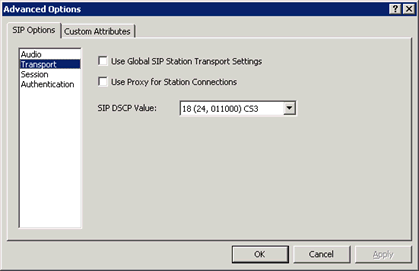
Click Transport in the left column. The Transport dialog box appears.
-
Clear the Use Global SIP Station Transport Settings check box. The SIP DSCP Value box is available.
-
In the SIP QOS Byte box, specify the QoS setting. The optimal setting for VoIP packets is
60(hex), which is equivalent to a DSCP value of24. To disable DSCP tagging, set the value to0.Note:
The provisioning server reads this value and includes it in the phone configuration file.