


- Contents
Genesys Cloud for PureConnect Administrator's Guide
How do I check Genesys Cloud Integration status and activity?
Note: Genesys Cloud Bridge replaces PureCloud Bridge. Bridge status available previously in PureCloud Admin > Integrations > Bridge no longer applies.
You can check the status of the integration in Genesys Cloud Integration Health. This shows at a glance all of your eligible PureConnect users, workgroups, wrap-up codes, and skills synced to your Genesys Cloud organization. You can also monitor the status of ClientIds used for integration authentication; this appears as OAuth Client Apps. If you are sending event data to Genesys Cloud (see Configure Genesys Cloud for PureConnect), you can also monitor the status of the Genesys Cloud Conduit for PureConnect.
Other ways to check integration and synchronization status are:
-
The Workforce Engagement view in Interaction Connect. For more information, see Genesys Cloud Configuration Status.
-
The Genesys Cloud information for selected records in Interaction Administrator. For more information, see the FAQ, How do I check synchronization status for selected records?
-
Using Windows Event IDs to monitor the status of Genesys Cloud Bridge.
Interaction Administrator
-
In the Interaction Administrator Genesys Cloud Configuration dialog box, select the Genesys Cloud Integration Health tab.
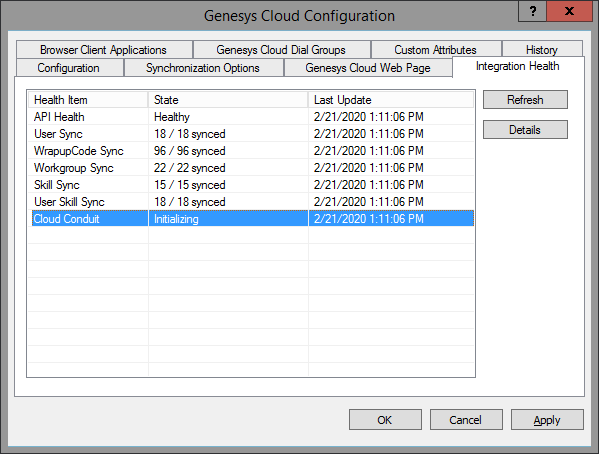
-
Select a Health Item and click Details.
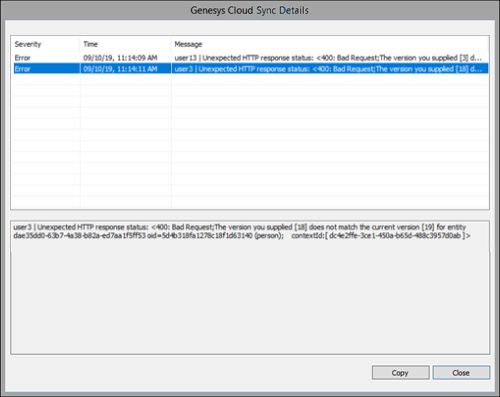
-
In the Details view, select an item and view additional information.
-
Optionally, click Copy to place the information on the Clipboard for forwarding to your Customer Care representative.
Windows Event IDs
These two event IDs apply to Genesys Cloud Bridge status. Check for these event IDs in the Windows Log Viewer or an SNMP trap on the CIC Server.
MessageId=47000
SymbolicName=MSG_PURECLOUD_CONNECTION_LOST
Language=English
Genesys Cloud connection lost.
MessageId=47001
SymbolicName=MSG_PURECLOUD_CONNECTION_RESTORED
Language=English
Genesys Cloud connection restored.