


- Contents
Interaction Reporter Help
Exporting Formatted Data
You can export formatted data from a report that is displayed in the Workspace.
Exporting Crystal reports data
You can export a Crystal report using the main toolbar or the Report Viewer toolbar.
Main toolbar
To export your Crystal report to one of the supported formatted data formats:
-
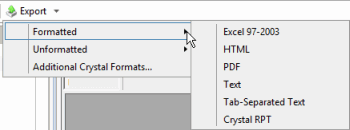
From the Interaction Reporter main toolbar, click Export

-
On the Export menu point to Formatted, and then select the file format that you want to export the report to.
-
On the Save As dialog, name and save the file. A progress indicator displays the status of the exported file.
Report viewer toolbar
To export your Crystal report to one of the supported formatted data formats:
-
When your report is displayed in the workspace, click the Export Report button on the report viewer toolbar.

-
On the Export Report dialog, select an export report format from the Save as type drop-down list.
Exporting ActiveReports data
Export ActiveReports using the main toolbar. To export your ActiveReport to one of the supported formatted data formats:
-
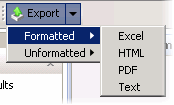
From the Interaction Reporter main toolbar, click Export
-
On the Export menu point to Formatted, and then select the file format that you want to export the report to.
-
On the Save As dialog, name and save the file. A progress indicator displays the status of the exported file.
Related Topics