


- Contents
Interaction Reporter Help
Exporting Unformatted Data
You can export report data in an unformatted data format from a report that is displayed in the Workspace.
Unformatted report data can be exported to:
-
CSV format
To export your report data to a CSV data format:
-
From the Interaction Reporter toolbar, click Export
 .
. -
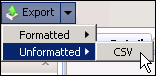
On the Export menu point to Unformatted and then click CSV.
-
On the Save As dialog, name and save the file. A progress indicator displays the status of the exported file.
Related Topics