


- Contents
PureConnect Release Notes
Interaction Web Chat Improvements
A new web chat interactions feature highlights a chat interaction as soon as specific conditions are met. There are two conditions for which a chat is highlighted:
-
An interaction dialog for the chat is open, the chat has been updated, and the window has not yet received focus. Previously, this condition caused the Windows taskbar entry for this dialog to flash. It still flashes, but now the chat interaction is also highlighted. Once the window receives focus, the highlighting for that interaction goes away.
-
The chat interaction is on an ACD-routed workgroup, and the workgroup configuration specifies a Chat Response Time setting (see the related figure). If an internal user does not update the chat prior to the response time limit that is configured for the workgroup, the chat is highlighted. The highlighting goes away only after an internal user enters text into the chat. This feature is useful for organizations that want to remind or warn agents if a chat response time exceeds the specified time limit.
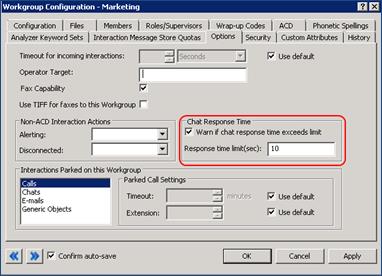
Chat Response Time Configuration
A typing indicator now appears for web chat interactions in Interaction Client Web Edition.